Key Takeaways:
What is a Stockist Account on Shopify?
A Stockist Account on Shopify is a B2B customer account that gives approved retailers or wholesale buyers access to exclusive pricing and discounts in exchange for bulk purchases.
Why Create a “Become a Stockist” Page?
Shopify is built for retail by default. A dedicated stockist page gives approved buyers a gated portal with wholesale pricing, minimum order rules, and flexible payment terms like Net 30.
How to Onboard Stockist Accounts on Shopify?
Use a signup form to capture applicant details, then approve accounts manually through Shopify Forms, Shopify Flow or automatically via a third-party B2B app like Wholesale Pricing Discount B2B by Wholesale Helper.
Do I need Shopify Plus to create stockist accounts?
No. Stockist accounts work on any Shopify plan using customer tags, an approval flow, and third-party wholesale apps. Native B2B features like Companies and Catalogs are exclusive to Shopify Plus.
Can I manually approve stockist signups in Shopify?
Not as a built-in approval gate. The practical setup is to tag new customers as “pending”, review them, then change the tag to “approved” and use Shopify Flow plus your wholesale app to apply wholesale pricing/access only after approval.
If you’re selling wholesale on Shopify and want to onboard stockists and display exclusive pricing to approved buyers, you’re in the right place.
This step-by-step guide will walk you through creating a “Become a Stockist” page on Shopify and setting up B2B customer accounts for your store without Shopify Plus.
What does a stockist account on Shopify mean?
A stockist account on Shopify is a specialized B2B customer account that grants approved retailers or wholesale buyers access to exclusive pricing, discounts, and terms in exchange for purchasing products in bulk.
Rather than shopping at standard retail prices, stockists, typically businesses that stock and resell a brand’s products, are offered preferential rates that reflect the volume and regularity of their orders.
Merchants use stockist accounts to manage their wholesale relationships directly within Shopify, often setting custom price lists, minimum order quantities, and payment terms tailored to each account or customer group.
Shopify supports all of this, but the implementation depends on whether you’re using Shopify Plus or a third-party app for a tag-based wholesale setup – the latter being available on any plan.
How to Set Up Your Stockist Accounts on Shopify? (Steps)
A “stockist account” is simply a customer account that you approve manually. Once approved, that customer can log in and (1) see wholesale pricing and (2) access wholesale-only products/collections, while regular shoppers continue to see your normal retail store.
What you’ll build:
- A quick test flow to confirm everything works end-to-end
- A “Become a Stockist” application page
- A simple approval process using customer tags (Pending → Approved)
- Tag-based wholesale pricing (and optional access restrictions)
Step 1: Turn on the new Customer Accounts (passwordless login)
Shopify’s newer customer accounts use passwordless sign-in. Buyers enter their email and receive a one-time 6-digit code, which reduces “forgot password” support requests and keeps the login experience straightforward.
To enable it, go to Shopify Admin > Settings > Customer Accounts, select the new Customer Accounts option, and save.
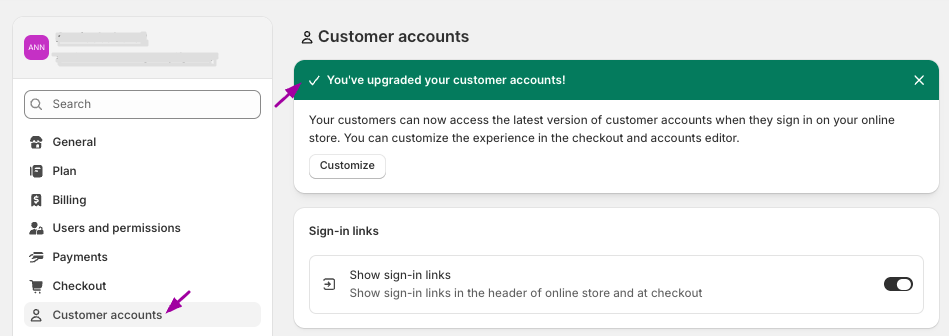
Important detail (so you don’t get surprised later): if someone signs in with an email that isn’t already in your customer list, Shopify can create a new customer profile automatically. That’s normal behavior with the new accounts experience, so your “approval” is enforced by tags + pricing/access rules (not by trying to prevent account creation).
Step 2: Create a “Become a Stockist” Application Form
Shopify doesn’t include a built-in “approved registrations only” gate for wholesale-style signups, so the clean workaround is to stop pushing buyers to a normal signup link and instead send them to a dedicated application page.
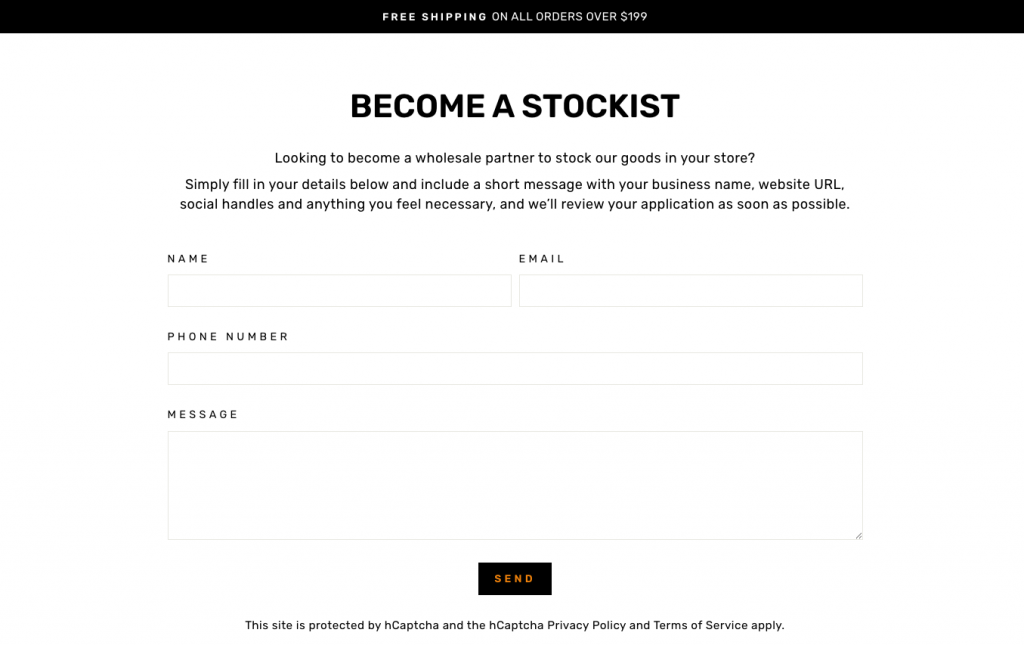
Create a page called “Become a Stockist” and add an application form. You can do this either using the Shopify Forms app or a third-party wholesale app.
In Shopify Forms, you can set a customer tag that gets applied on submission (for example: stockist-pending). This makes it easy to filter and review new applicants.
Alternatively, if you’d rather skip the manual setup, third-party wholesale apps like Wholesale Pricing Discount B2B let you create a custom stockist signup form with automated tagging and approval built in.
Finally, don’t forget to collect relevant business details such as Business Name, Store Address, Website, and Resale Tax ID.
Step 3: Set Up Your Approval Workflow (and automate it with Shopify Flow)
At this stage, the goal is simple: only customers you approve become “real stockists.” You can keep the approval decision manual, but let Shopify Flow handle the repetitive cleanup and follow-ups.
How the approval should work (no matter how the request comes in):
- When someone asks to become a stockist (via your form, email, phone, trade show, DM, etc.), create/find their customer profile in Shopify and give them a holding tag like
stockist-pending. - Review the details the way you normally would.
- When you decide to approve them, you add
stockist-approvedto their customer profile.
Where Shopify Flow fits in
Shopify Flow won’t “decide” approval for you, but it’s perfect once you tag someone as approved.
Set up a Flow like this:
- Trigger: Customer tags added
- Condition: Tag contains
stockist-approved - Actions:
- Remove the
stockist-pendingtag (so your list stays clean) - (Optional) Add an internal note like “Approved as stockist on {date}”
- (Optional) Notify your team on email/Slack
- Trigger your welcome email (best done via Shopify Email / Marketing Automations), with login instructions and what they can expect inside the wholesale portal
- Remove the
Step 4: Apply wholesale pricing (and optionally restrict access until approved)
Since standard Shopify does not natively separate B2B and DTC pricing, you will need a third-party app that reads customer tags and adjusts prices accordingly. Several wholesale apps like on the Shopify App Store support this, allowing you to create rules such as: customers tagged stockist-approved receive 40% off storewide. You can also set up more granular rules based on quantity, product, or collection, using pricing methods like percentage off or fixed price reductions.
Unauthenticated retail visitors will continue to see standard pricing, while approved stockists will see their wholesale rates upon logging in.
If you’re using Wholesale Pricing Discount B2B, it’s built around this exact tag-based wholesale setup (pricing rules, tiers, customer group logic).
Step 5: Test the Buyer Experience
Before going live, create a test customer account, apply the stockist-approved tag, and log in using the passwordless flow. Verify that wholesale prices appear correctly on product pages and at checkout. It is also worth testing edge cases, such as products excluded from discounts or minimum order rules.
Step 6: Set Up Additional Wholesale Features
Once the core setup is in place, you can expand your wholesale portal with additional features depending on your business needs.
These include net payment terms such as Net 30, Net 60, or Net 90; bulk ordering and reorder forms; shipping rules based on weight or order value; multicurrency pricing for international buyers; tax exemptions such as VAT; and access restrictions to limit certain products or collections to approved stockists only.
Most of these are typically implemented via apps or additional configuration, so treat them as “Phase 2” after pricing and approval are working smoothly.
Create a Stockist registration process on Shopify and
offer wholesale prices like a pro!
Try our Wholesale Pricing Discount app for free
Trusted by over 17,000 Shopify merchants
Common Mistakes to Avoid
Skipping a “pending” tag for new applicants is one of the quickest ways to lose track of who has and hasn’t been reviewed — approvals get messy fast without it. It’s also worth making sure your pricing and access rules actually reference the stockist-approved tag; approving an account means nothing if the storefront experience doesn’t change for that customer. Finally, always test checkout specifically — prices can appear correct on product pages but behave differently at checkout if something is misconfigured.
A Note for Shopify Plus Merchants:
If you are on Shopify Plus, you do not need third-party apps to change prices based on tags. You will use the native B2B suite. The Winter 2026 Edition brought massive upgrades to this suite:
- AI Company Creation: Sidekick, Shopify’s AI assistant, can now instantly build B2B company profiles, add locations, and assign catalogs just from a simple text prompt.
- B2B Store Credit: You can now issue store credit directly to a company location (capped at $10,000 USD), allowing any purchasing agent from that location to use it at checkout or toward invoice payments.
Summary
On a standard Shopify plan, the most practical approach to stockist accounts is combining Shopify’s passwordless Customer Accounts with a tag-based approval workflow. Collect applications through a dedicated form, verify credentials, and apply a tag like stockist-approved to approved accounts. A third-party wholesale app then reads that tag and applies the appropriate pricing, keeping wholesale rates hidden from regular retail visitors. Shopify Plus merchants can handle much of this natively through the built-in B2B suite.

![Top 11 Wholesale Suppliers In the USA [in 2024]](https://wholesalehelper.io/blog/wp-content/uploads/2024/09/Top-11-Wholesale-Suppliers-In-the-USA-in-2024-1-150x150.png)