



Key Takeaways
- Wholesale prices can appear in Google even with a login wall in place, because Google reads the product URL directly rather than the customer-facing version of the page.
- The seo.hidden metafield is the simplest way to remove a product page from Google on Shopify. No code is needed, and it handles sitemap exclusion automatically.
- To keep a page indexed but hide the price, the fix is in the JSON-LD structured data block, not the page-level indexing settings.
- Editing robots.txt is the wrong approach here, as it controls crawling, not indexing, and mistakes in that file can take months to recover from.
- After applying any fix, use the URL Inspection Tool in Google Search Console to request a recrawl rather than waiting.
In this quick guide, we will learn how to noindex products on Shopify. This guide is extremely useful especially for B2B and Wholesale stores.
Plenty of B2B merchants hit this and can’t figure out why. Prices are locked behind a login gate. Buyers can’t see them without an account. But search results still show the wholesale rates, in snippet text, in rich results, sometimes right under the product title. Google’s crawler skips the login entirely.
Search bots go straight to the product URL. No account, no session, just the raw page source and buried in that source is a JSON-LD block that most Shopify themes output automatically. It carries the product name, availability, and price. That data reaches Google, whether or not anyone is logged in.
So the question is what you actually want, i.e, the product gone from search completely, or just the price stripped from what Google displays.
Using the seo.hidden Metafield to Noindex products on Shopify
Shopify has a built-in metafield for exactly this. Set seo.hidden to 1 on a product and three things happen automatically. A noindex, nofollow tag gets added to that page, it drops off your XML sitemap, and it disappears from internal search results. No theme edits needed.
Most stores won’t have the metafield definition set up yet, so start there.
Head into Settings then go to Metafield and Metaobjects.

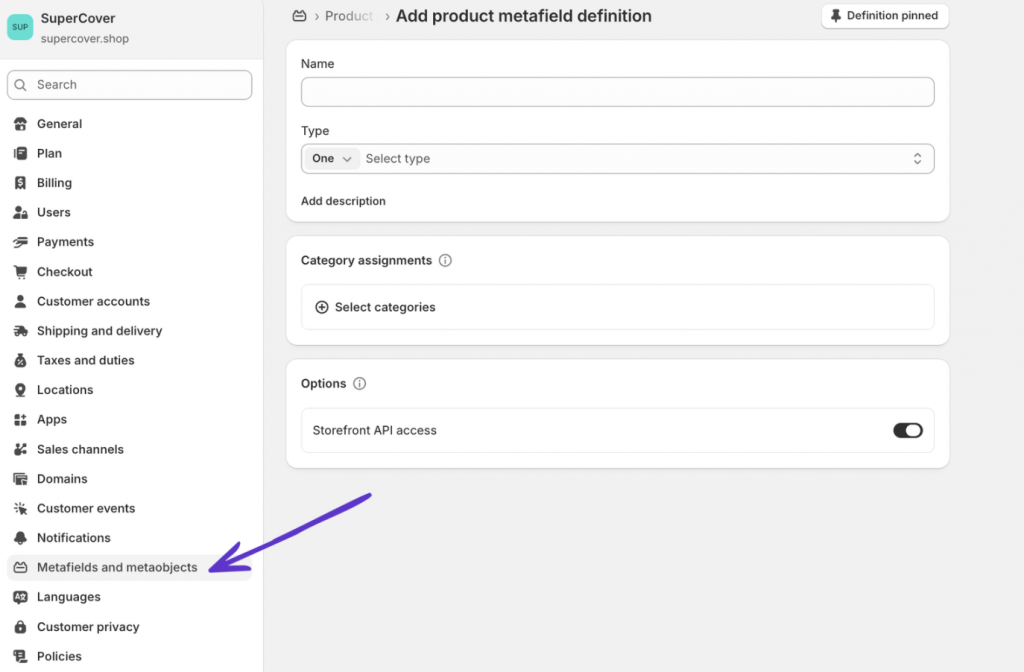
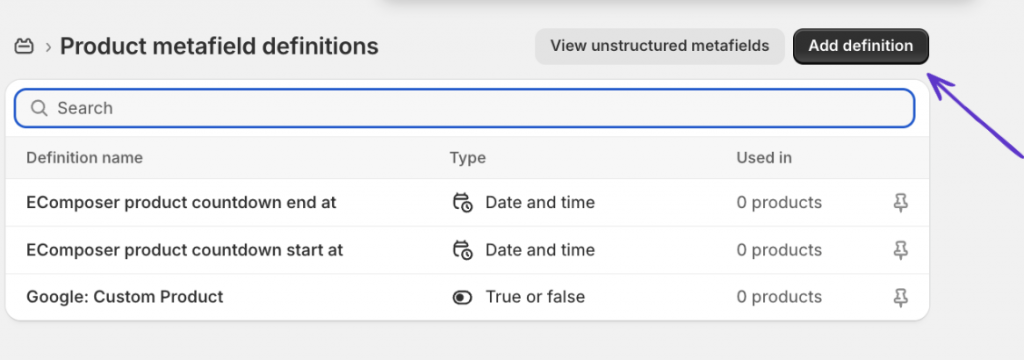
Pick Products and click Add definition. The name doesn’t matter much — “Hide from search engines” works. What does matter is the Namespace and key field as it must read exactly seo.hidden, nothing else. Pick Integer as the content type, set it to one value, and save.

Once the definition is there, open any product you want removed from Google. Scroll to the Metafields section at the bottom, enter 1 in the seo.hidden field, and save the product. That’s it.
The page won’t vanish from Google straight away. It needs to be recrawled first. High-traffic pages often clear within days. Others can sit in the index for a few weeks. The Search Console section further down covers how to push this along.
One thing worth being clear on is that this removes the page entirely from search. If you want the product to stay discoverable in Google but just without the price attached, the approach is different and is covered next.
Editing theme.liquid for specific page handles
There are situations where the metafield approach gets unwieldy, particularly when you’re targeting one or two specific pages and don’t want to set up a whole metafield definition for it. In those cases, adding a conditional noindex tag directly to theme.liquid is faster.
Duplicate your active theme before touching anything. theme.liquid sits under every page on your store. A small mistake there can break things in ways that aren’t immediately obvious.
From the Shopify admin, open Online Store and go to Themes. Hit the three-dot menu on your active theme, choose Edit code, then find theme.liquid in the Layout folder. Paste this inside the <head> section:
{% if handle contains ‘your-page-handle-here’ %}
<meta name=”robots” content=”noindex,follow”>
{% endif %}
Swap out your-page-handle-here for the actual page handle. A product living at yourstore.com/products/wholesale-bundle has the handle wholesale-bundle.
Noindex,follow blocks indexing, but still lets Google follow links on that page. To cut both, use noindex,nofollow instead.
The conditional logic has to be exact. theme.liquid powers every single page on your store, so any mistake here can silently remove pages from search. Test on a duplicate theme if you’re not confident in the logic.
Removing the Price from JSON-LD
Not every merchant wants to pull their product pages from search entirely. Some just want the price to stop showing in snippets while keeping the product itself discoverable. In that case, the page-level noindex isn’t the right move since the price is coming from the structured data, and that’s where it needs to be removed.
On the Dawn theme, the JSON-LD block lives in sections/main-product.liquid. Other themes put it somewhere in the product template file. Search for a script tag with type=”application/ld+json” and inside you’ll find an “offers” object containing a “price” property. That property is what Google reads to populate rich snippets.
Delete the price property from that object. The product page stays indexed. Google just loses the data it needs to show pricing in results.
Expect two things after making this change. Google Search Console will start logging structured data errors on those products and that’s normal and won’t touch your rankings. And rich snippets showing prices in search results will disappear for those products, which is exactly what you’re after.
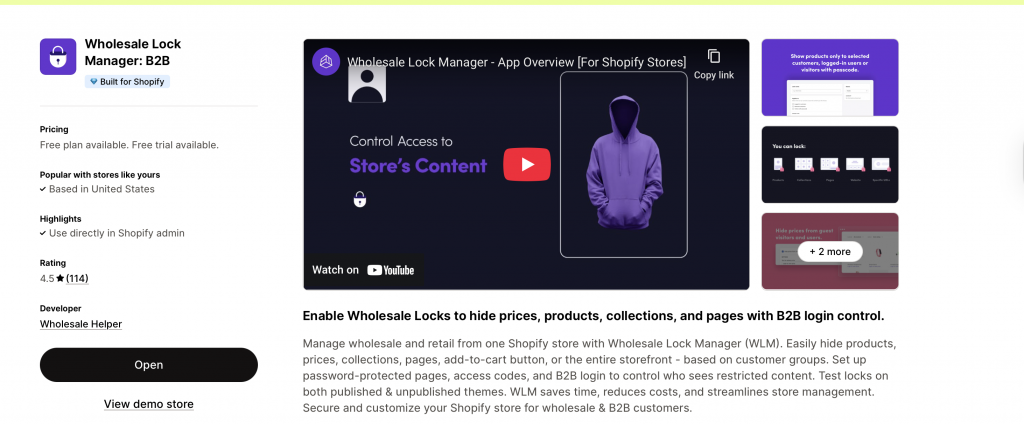
If this setup looks too complex, you can use a Shopify app like the Wholesale Lock Manager B2B to hide prices and products from customers as well as Google.

Why Robots.txt won’t Solve this
Robots.txt is the go-to suggestion in a lot of forum threads on this topic. It’s the wrong tool.
What robots.txt does is tell Google’s crawler whether to visit a URL. It says nothing about whether that URL gets indexed. So if Google already has a page in its index, or if even one external site has ever linked to it, a disallow rule won’t pull it from results. A noindex tag is what actually handles removal.
There’s also real risk in editing robots.txt without knowing exactly what you’re doing. Write a rule that’s slightly too broad and you can silently deindex chunks of your store. Recovering that visibility can take months. Don’t touch it for this problem.
Getting Google to Act Faster
The noindex tag doesn’t remove the page, it just signals to Google what to do on the next crawl. Low-traffic pages can wait weeks for that crawl to happen.
Open Google Search Console and paste the product URL into the URL Inspection Tool. Still showing as indexed? Hit Request indexing and Google will bump it up the queue. Usually shaves a few days off the wait.
For something quicker, the Removals tool in the sidebar lets you file a temporary removal. Paste the URL, submit, and the page typically clears within a day or two. It’s not permanent, the noindex tag still needs to be picked up on a proper crawl, but it gets the price out of results fast while that happens.
Check back in Search Console after a week or so to confirm the URL is no longer indexed.
Other things worth checking
Sitemap. seo.hidden removes the URL from the sitemap automatically. The theme.liquid method doesn’t. If that’s the route you took, go check whether the URL is still sitting in your sitemap and remove it. Having a noindexed URL in your sitemap isn’t a crisis, but it’s a loose end.
Login walls and crawlers. Apps that restrict access to your storefront control the visitor experience. Crawlers don’t have a visitor experience and they read the source. The only way to stop Google getting at data on a product page is to either remove the page from its index or strip the relevant data from the structured data block.
Backlinks. External sites linking to a product page you’ve noindexed will slow the removal down. Google honours noindex tags, but an incoming link is a reason to keep checking. Rare for wholesale product pages, but worth knowing if a URL has been around a while.
Frequently Asked Questions
Why are my wholesale prices showing in Google even though they’re behind a login?
Your login wall controls what a browser session sees. Google’s crawler hits the underlying product URL without going through any login flow, and reads everything in the page source including the JSON-LD structured data, which is where the price data lives.
What does setting seo.hidden to 1 actually do?
It tells Shopify to add a noindex, nofollow meta tag to that page, drop it from the XML sitemap, and remove it from your store’s internal search. All three happen together once the value is saved on a product.
Will removing product pages from Google hurt my SEO?
Not for the rest of your store. Noindexing a handful of wholesale-only products has no effect on your other pages, collections, or anything else. The only things that change are the specific products you’ve targeted.
Can I keep a product page in Google but stop the price showing?
Yes. Remove the price property from the JSON-LD structured data block on the product page. The page stays indexed and searchable. Google just won’t have a price to show in rich snippets.
How long before a noindexed page disappears from Google?
Crawl frequency varies by page. A product that gets regular traffic might clear within a few days once recrawled. A rarely-visited URL can sit in the index for several weeks. Submitting the URL through the URL Inspection Tool in Google Search Console is the fastest way to push a recrawl.
Does this work for collection pages too?
Yes. The seo.hidden metafield works on products, pages, and blog posts. For collection pages, the theme.liquid method works fine — just target the collection handle in the conditional.
Ready to impress your B2B customers? Start wholesaling like a pro! 🙂
Try our Wholesale Pricing Discount app for free !
Trusted by over 15,000 Shopify merchants