


Quick Answer
Yes. You can offer Net Payment Terms on Shopify, such as Net 30, Net 60, or other custom terms. This is achieved by combining customer tags, draft orders, and specialized Shopify apps like Wholesale Pricing Discount B2B. This powerful trio allows approved B2B buyers to complete orders and pay later without requiring any complex custom coding.
More In-Depth Guide:
This article gives you a quick overview of how to offer net payment terms on your Shopify store. For a comprehensive breakdown of what are the net payment terms, why offer it, where to offer them, how to keep track of these terms, and how to follow up with your B2B customers for unpaid net terms invoices, you can check out this guide: What are Net Payment Terms, Importance, and How to Offer – 2025
What Are Net Payment Terms in B2B E-commerce?
Net payment terms empower business-to-business (B2B) customers to delay payment until after they receive an order, rather than requiring immediate upfront payment at checkout. This flexible payment structure is crucial for fostering strong B2B relationships and facilitating larger transactions.
Common Net Payment Terms:
- Net 30: Payment is due within 30 days from the invoice date.
- Net 60: Payment is due within 60 days from the invoice date.
- Custom Terms: Tailored payment schedules based on negotiated agreements or specific buyer tiers (e.g., Net 45, Net 90, or even milestone-based payments).
Why are Net Payment Terms Essential for B2B?
These terms are vital for:
- Wholesale Accounts: Businesses buying in bulk often require credit terms.
- Distributors and Resellers: Companies that sell your products to end-consumers need time to manage their cash flow.
- Corporate Procurement Buyers: Large organizations typically operate on purchase orders and extended payment cycles.
- Building Trust: Offering credit demonstrates confidence in your B2B partners.
- Facilitating Larger Orders: Removing the upfront payment barrier encourages higher order values.
Step-by-Step: Setting Up Net Payment Terms on Shopify
Step 1: Tag Net Terms-Eligible Customers
The first critical step is to identify and tag your customers who qualify for post-pay terms within your Shopify admin. These tags act as identifiers for your system and apps.
Tag Examples:
- net-30
- b2b-approved
- invoice-eligible
- credit-approved
- wholesale-client
Pro Tip for Automation: Utilize Shopify Flow to automate customer tagging. You can set up workflows to auto-tag customers based on specific criteria, such as a successful credit application form submission, a minimum purchase history, or manual approval by your sales team.
Step 2: Leverage Shopify Draft Orders for Post-Pay Checkout
Shopify’s native checkout is designed for immediate payment. To facilitate Net Terms, you’ll utilize Draft Orders – a powerful built-in feature that allows you to create orders and send invoices.
Net Terms Workflow using Draft Orders:
- B2B Buyer Places Order (or Request): The customer browses your store and adds items to their cart.
- Draft Order Creation: You (or an integrated app) create a Draft Order based on the customer’s cart.
- Invoice Generation & Delivery: Send the invoice to the customer via email. You can also provide a direct link for offline payment instructions (e.g., bank transfer details) or integrate with a manual payment gateway.
- Customer Payment: The buyer pays the invoice within the agreed-upon terms (e.g., 30 or 60 days) using methods like ACH transfer, check, or a manual bank transfer.
Integration Tip: Shopify’s built-in Draft Order feature is robust. For advanced invoicing and accounts receivable management, consider integrating with popular accounting and payment apps like QuickBooks, Xero, or dedicated Accounts Receivables solution.
Step 3: Enforce Net Terms Logic with a Pricing App
To automate pricing, minimums, and checkout flow for your net terms customers, install a specialized Shopify app like Wholesale Pricing Discount B2B.

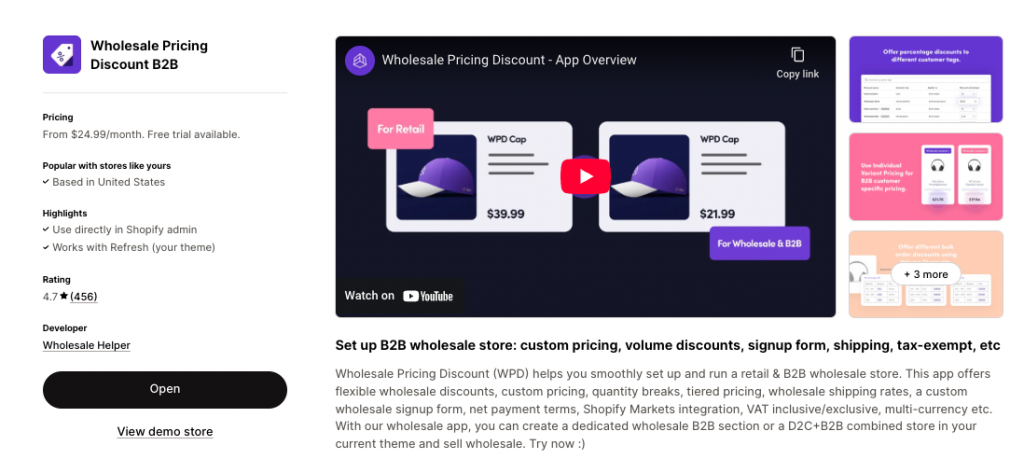
Key functionalities of such an app:
- Tag-Based Rules: Associate specific customer tags (e.g., net-30) with custom pricing tiers and payment options.
- Custom Pricing: Apply special wholesale pricing or discounts only to your tagged B2B buyers.
- Minimum Order Values (MOQs): Enforce minimum order quantities or values for net terms orders.
- Checkout Redirection/Blocking: For customers tagged for net terms, the app can automatically block the standard instant payment checkout and redirect them to an “Invoice Request” page or generate a Draft Order directly.
Step 4: Clearly Communicate Terms on Product & Cart Pages
Transparency is key for a smooth B2B buying experience. Ensure your net payment terms are clearly communicated on the relevant pages of your Shopify store.
Where to Add Messaging:
- Product Pages: Add a note like: “Net 30 available for qualified business buyers. Please apply here.”
- Cart Page: Display a message such as: “Your payment will be due within [30/60] days after order fulfillment. An invoice will be sent via email.”
- Dedicated B2B/Wholesale Page: Create a comprehensive page outlining your wholesale program, including payment terms, application process, and benefits.
Implementation: Use Shopify’s metafields, dynamic banners, or cart notes to display this payment logic clearly before the customer proceeds to checkout.
Example: How Net 30 Works in Practice (Case Study: Commercial Restaurant Supplies, Dallas, TX, USA)
Let’s illustrate with a hypothetical scenario for a B2B business operating out of Dallas, Texas, USA:
Brand: “Southwest Supply Co.” (based in Dallas, specializing in commercial kitchen and restaurant supplies)
B2B Customer: “Grill & Chill Diner” (a restaurant business in Austin, Texas, tagged net-30-us and b2b-approved)
Workflow:
- Login & Order: Grill & Chill Diner logs into Southwest Supply Co.’s Shopify store and adds a new industrial fryer to their cart.
- Checkout Redirection: Due to their net-30-us tag, the standard instant payment checkout (credit card, PayPal) is bypassed. Grill & Chill Diner is redirected to a page that says, “As an approved B2B partner, your payment is due in 30 days. An invoice will be sent to your registered email.”
- Invoice Receipt: Southwest Supply Co. (or its integrated app) automatically generates an invoice for the fryer and emails it to Grill & Chill Diner. The invoice clearly states “Payment Due: Net 30” and includes details for ACH transfer or mailing a check.
- Payment: Within 30 days, Grill & Chill Diner initiates an ACH bank transfer or mails a check to Southwest Supply Co.’s account to settle the invoice.
Visibility: On the cart page for Grill & Chill Diner, a clear message reads: “Your order payment is due within 30 days via ACH or check. An invoice will follow shortly.”
Ready to offer Net Payment Terms your B2B customers?
Try our Wholesale Pricing Discount app for free !
Recommended App Stack to offer Net Terms on Shopify
To maximize your Shopify store’s B2B capabilities with net payment terms, consider this app stack:
- Pricing & Tag Logic: Wholesale Pricing Discount B2B (or similar app) – Essential for assigning custom pricing, minimums, and linking customer tags to payment term eligibility.
- Checkout Access Control: Wholesale Lock Manager (or similar app) – Enables you to control which checkout options are visible to specific customer segments, redirecting net terms customers to an invoicing flow.
- Invoice/Order Reminders: AReceivables (or similar dedicated AR app) – Helps automate invoice generation, reminders, and payment tracking, streamlining your cash flow.
- Automation: Shopify Flow – For automating customer tagging based on application forms, order history, or other criteria, freeing up manual effort.
Accounting Integration: QuickBooks, Xero, or similar – For seamless synchronization of orders and invoices with your accounting system, simplifying reconciliation and financial reporting.
Final Summary
Net payment terms are not just a convenience; they are a critical component for scaling B2B commerce effectively. By strategically leveraging Shopify’s native features alongside the right third-party applications, you can:
- Assign Flexible Terms: Offer Net 30, Net 60, or custom credit terms to your approved business buyers.
- Streamline Invoicing: Handle order and invoice processing efficiently through draft orders and integrated accounting solutions.
- Tailor Experience: Customize pricing, product visibility, and checkout rules based on customer tags.
- Support Global Workflows: Adapt your approach to accommodate diverse payment preferences and regulatory requirements across different regions.
Begin by clearly identifying and tagging your eligible buyers and establishing a straightforward invoice flow. From there, progressively enhance your system with advanced pricing rules, automation, and precise access controls to build a truly robust B2B e-commerce operation.
Ready to offer Net Payment Terms your B2B customers?
Try our Wholesale Pricing Discount app for free !
Frequently Asked Questions (FAQs)
Can I offer Net 30 without Shopify Plus?
Yes! Net Terms workflows are fully achievable with Basic, Standard, and Advanced Shopify plans by effectively using customer tags, draft orders, and third-party apps. Shopify Plus offers more native B2B features, but it’s not a requirement for implementing net terms.
Can I automatically approve Net Terms customers?
Absolutely. Use Shopify Flow to create automation rules. For example, customers who complete a “B2B Credit Application” form (using an app like Form Builder or JotForm) and meet specific criteria (e.g., minimum annual revenue, positive credit check) can be automatically tagged for net terms eligibility.
Can I block the normal checkout for Net Terms customers?
Yes. Apps like “Wholesale Lock Manager” or similar checkout control solutions allow you to hide the standard payment options (credit card, PayPal) for customers with specific tags (e.g., net-30) and redirect them to a custom page or prompt them to request an invoice.
Can I show different pricing for Net Terms buyers?
Yes. Combine your Net Terms customer tags with pricing rules in a wholesale pricing app (like “Wholesale Pricing Discount B2B”). This enables you to display specific pricing tiers, discounts, or even exclusive products only to your approved B2B customers.
How do I track unpaid orders and manage receivables?
You can use Shopify’s order status system to track orders marked as “pending payment.” For more robust accounts receivable management, integrate your Shopify store with dedicated accounting software like AReceivables, QuickBooks, Xero, or even maintain a manual tracking system if your volume is low.
Net payment terms vs Partial payments (Installments)
Net Payment Terms and Partial Payments are not the same—though both relate to flexible B2B payment structures, they serve different use cases.
In Net Payment Terms: The buyer pays 100% of the invoice later, within a set number of days (e.g., 30, 60, or 90) after the order is fulfilled or invoiced.
In Partial Payments: The buyer pays part of the total upfront, and the rest later, typically in two or more installments.
Net Payment Terms use case: Common in wholesale, distribution, or B2B procurement, where buyers need to receive goods first and pay later.
Partial Payments use case: Useful when you want to secure commitment upfront but still offer flexible payment—like a deposit + balance model.
Net Payment Terms Example: A restaurant places a $2,000 order and agrees to pay the full amount within 30 days of delivery.
Partial Payments Example: A boutique places a $1,000 wholesale order, pays $400 upfront, and the remaining $600 after 2 weeks.