


If you’re operating a B2B Shopify store, selling to wholesale buyers, government entities, educational institutions, or large corporate accounts, the question “Can we pay by purchase order (PO)?” is likely a frequent one. While Shopify doesn’t offer a native “PO” payment method out of the box, there are robust and reliable ways to simulate it effectively. This guide will walk you through how to enable purchase orders in Shopify, clarify what POs are, identify who uses them, and demonstrate how to manage them efficiently without needing a Shopify Plus subscription.
Free Resource: A Quick Start Guide to Creating a Wholesale Store on Shopify 📋
What Exactly Are Purchase Orders in Shopify (PO)?
A Purchase Order (PO) is a document issued by a buyer to a seller as a formal confirmation of a purchase that clearly specifies:
- What goods or services are being bought?
- The quantity required.
- The agreed-upon price for each item.
- The delivery date or timeframe.
- The payment terms (e.g., Net 30, Net 45, Net 60) indicate when the invoice must be paid after goods are received.
POs are universal in B2B, institutional, and wholesale transactions. Unlike typical retail, where payment is made upfront at checkout, a PO-based transaction involves:
- The buyer submits a PO.
- The seller accepts the PO and then fulfills the order.
- The buyer receives the goods.
- The seller sends an invoice.
- The buyer pays the invoice later, adhering to the agreed-upon Net Terms.
Who Benefits from Implementing Purchase Orders in Shopify Stores?
Purchase Order (PO) payment is not for every customer. It’s typically reserved for trusted buyers with established credit. These include:
- Schools, Universities, and Government Agencies: These entities almost always operate on a purchase order system for accountability and budget management.
- Corporate Procurement Teams: Large companies frequently use POs to manage their purchasing, often with specific payment cycles like Net 30.
- Distributors or Resellers: Businesses offering purchases on net payment terms often prefer or require POs for their bulk orders.
- Repeat Wholesale Customers: For long-standing wholesale buyers with pre-negotiated credit terms, paying by PO streamlines their reordering process.
These types of buyers are pre-approved and expect a “Buy now, pay later” workflow, making the PO payment method a critical feature for any serious B2B Shopify store.
How to Enable PO Payment in Shopify (No Shopify Plus Required)
You don’t need a Shopify Plus subscription to implement a functional Purchase Order (PO) payment system. Here’s a step-by-step guide:
Step 1: Create a Custom Manual Payment Option
This is the core of enabling PO payment on your Shopify store.
- From your Shopify Admin, go to Settings → Payments.
- Scroll down to the “Manual payment methods” section and click “Add manual payment method.”
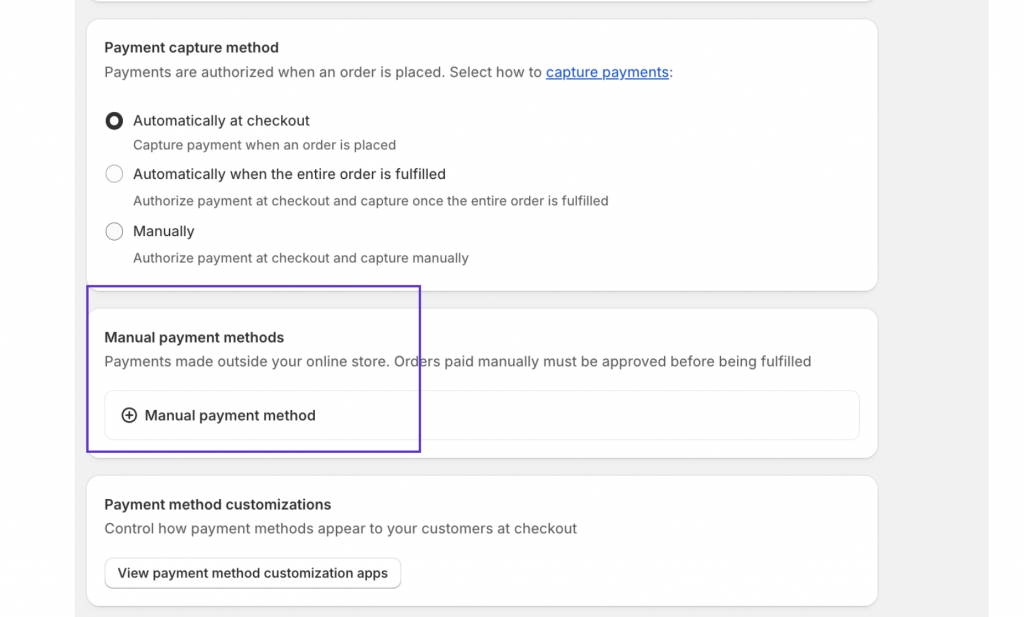
- Name it: Give it a clear name like “Pay by Purchase Order (PO)” or “Invoice (Net 30/45/60)”.
- Add Instructions: In the “Payment instructions” box, provide concise guidance that will appear on the order confirmation page. For example:
- “Approved Net Terms accounts only. Please enter your Purchase Order (PO) number in the ‘Order Notes’ field at checkout.”


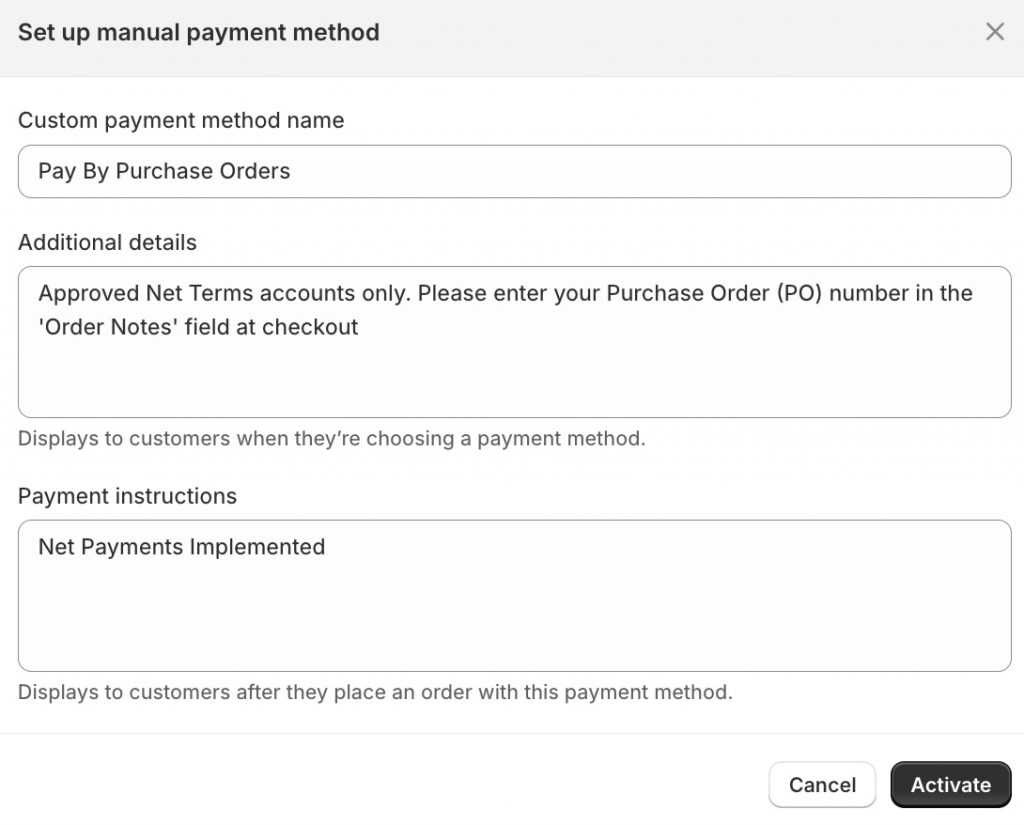
This custom method will now appear alongside your regular payment options at checkout.
Step 2: Restrict PO Option to Approved Customers
Since you want to control who can use the “Pay by PO” option, you’ll need a way to enforce this.
- Customer Tagging: Ensure you have a system for tagging your approved customers (e.g., po-eligible, net-30-account, government-client-india).
- Enforcement (Standard Shopify): Shopify’s native checkout on Basic/Standard plans doesn’t allow dynamic hiding of payment methods based on customer tags. Therefore, enforcement typically relies on:
- Clear Checkout Messaging: The instructions you set in Step 1 (“Only available to approved Net Terms accounts.”) serve as a deterrent.
- Manual Review: After an order is placed with a PO, your team manually verifies the customer’s eligibility. If an unauthorized customer attempts to use it, the order is cancelled, and they are contacted for an alternative payment.
- Checkout Logic (Shopify Plus): On Shopify Plus, you can use Shopify Flow or custom scripts to dynamically hide/show payment methods based on customer tags or other criteria at the checkout stage, offering a truly seamless experience for your B2B customers.
Step 3: Collect PO Numbers (Recommended)
Capturing the Purchase Order (PO) number is crucial for internal tracking and invoice reconciliation.
- Order Note Field: The simplest way is to add a note field on your cart page or checkout page where the buyer can enter their PO number. Many themes support this, or you can use a simple cart attribute app.
- Post-Checkout Collection: If a note field isn’t feasible, you can request the PO number via email or during the draft invoice process (Step 4).
Collecting the PO number keeps your workflow clean and ensures you can easily match the order to the correct invoice and internal records.
Step 4: Send Invoices & Manage Payments
Once a PO order is placed, the post-purchase process for payment begins.
- Convert to Draft Order & Invoice: From your Shopify Admin, locate the order placed with the “Pay by Purchase Order (PO)” method. You can convert this to a Draft Order and then email an invoice directly from Shopify, customizing the payment terms (e.g., Net 30).
- Accounting Software Integration: For robust financial management, integrate your Shopify store with accounting software like QuickBooks Online or Xero. These platforms allow you to generate and send formal invoices, manage accounts receivable, and track Net Terms payments.
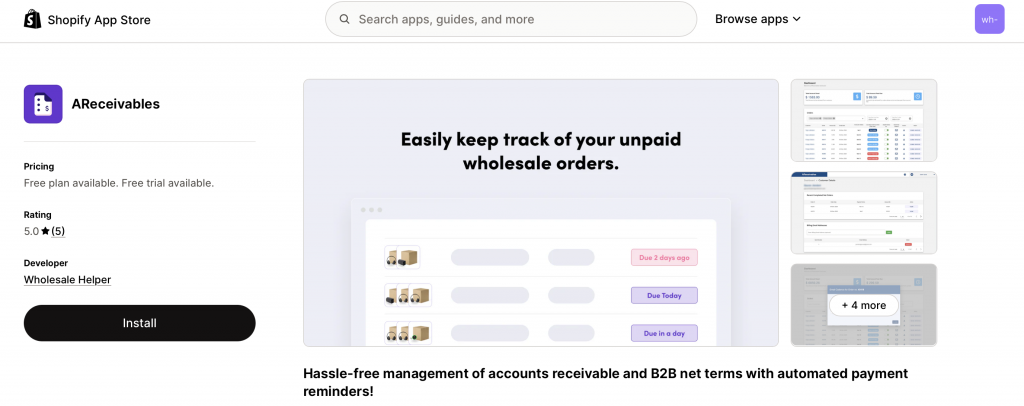
- Automated Receivables Tracking (App): To streamline follow-ups for unpaid POs and invoices, consider a dedicated app like AReceivables. This app can:
- Track payment due dates for Net Terms.
- Send automated payment reminders to customers (e.g., before due date, past due).
- Provide a centralized dashboard to manage all outstanding POs and invoices.

Real-World Example: An Eco Cleaning Supply Brand
Store: An eco-friendly cleaning supply brand serving corporate offices and institutions across Canada.
Customer: A procurement manager for a school district in Ontario, Canada, tagged as po-eligible and net-30-canada.
Workflow:
- The school district buyer logs into the B2B portal on the Shopify store.
- They add bulk cleaning supplies to their cart and proceed to checkout.
- At the payment step, they see “Pay by Purchase Order (PO)” as an option.
- They select the PO option and enter their school district’s PO number (e.g., SDO-2025-00123) into the “Order Notes” field.
- They complete the order.
- The brand’s team receives the order. They verify the PO-eligible tag and convert the order into a Draft Order in Shopify, then send a formal invoice via QuickBooks, with Net 30 terms.
- The order is fulfilled and shipped to the school.
- AReceivables automatically tracks the invoice and sends a reminder to the school’s finance department a week before the due date.
Without this structured PO payment system, the cleaning supply brand would either lose valuable institutional clients or face overwhelming manual reconciliation with spreadsheets.
Ready to impress your B2B customers? Start wholesaling like a pro! 🙂
Try our Wholesale Pricing Discount app for free !
Trusted by over 15.000 Shopify merchants
Frequently Asked Questions
Here are common questions users have about enabling Purchase Order (PO) payment on Shopify:
Can I completely prevent regular retail customers from seeing the PO payment option at checkout?

On Shopify Basic, Standard, or Advanced plans, you cannot dynamically hide manual payment methods based on customer tags directly at checkout. You must rely on clear instructional messages (“Only available to approved business accounts”) and manual review. Alternatively, you can use apps like Wholesale Lock Manager B2B to implement this functionality without Shopify Plus.
How do I track unpaid Purchase Orders (POs) and send reminders on Shopify?
While Shopify itself doesn’t offer robust receivables management, you can use dedicated apps like AReceivables to track due dates, view outstanding balances, and automate payment reminder emails for Net Terms invoices. Alternatively, integrating with external accounting software like QuickBooks Online or Xero allows comprehensive PO and invoice tracking.
Do I need Shopify Plus to offer Net Terms or PO logic to my customers?
No, not necessarily. As this guide demonstrates, the core functionality of accepting Purchase Orders (POs) and managing Net Terms can be achieved on any Shopify plan using manual payment methods, customer tags, and strategic use of draft orders, often supplemented by third-party apps for automation. Shopify Plus simply streamlines some of these processes with native B2B tools.
Can customers upload their official Purchase Order (PO) documents during checkout or post-checkout?
Yes. For checkout, you might need a custom solution or a specialized app that allows file uploads in the cart or checkout notes. Post-checkout, it’s easier: after a customer places an order using the PO payment method, you can instruct them via the order confirmation page or an automated email to reply with their official PO document attached.
How do Purchase Order (PO) payments impact my Shopify sales reports?
When a customer selects “Pay by Purchase Order (PO),” the order status in Shopify will be “Pending payment.” Once the invoice is paid and you manually mark the order as “Paid” in Shopify, it will then count as a completed sale in your Shopify reports. Apps like AReceivables can also provide specialized reports on your outstanding B2B receivables.
Is the “Pay by Purchase Order (PO)” method available for international B2B customers?
Yes. Since it’s a manual payment method you create, it’s globally available. Your instructions can clarify regional specifics (e.g., “For UK customers, payment due in 30 days to our GBP account”). For currency display, ensure your store utilizes Shopify Markets to show the PO amount in the customer’s local currency (e.g., INR for India, AUD for Australia).
Can I automate the generation of PDF invoices for Purchase Orders (POs)?
Yes. Apps like AReceivables often provide features to generate professional PDF invoices directly from Shopify orders, incorporating your branding and specific Net Terms. Many accounting software integrations also allow for automated invoice generation.
How do I ensure customers correctly enter their PO number?
You can make the note field where they enter the PO number mandatory (if your theme or a cart app supports this). Additionally, clearly state in the payment instructions that failure to provide a valid PO number may result in order delays or cancellation.
What happens if an unauthorized customer uses the PO payment method?
You would typically contact the customer to inform them that this method is reserved for approved B2B accounts. You’d then offer alternative payment methods or cancel the order if they don’t meet the criteria. Having a clear B2B signup and approval process is key to minimizing these instances.
Is it possible to apply bulk discounts or tiered pricing when customers pay by Purchase Order (PO)?
Yes. The payment method chosen (like PO) is separate from the pricing logic. You would use apps like Wholesale Pricing Discount B2B to apply bulk discounts or tiered pricing based on customer tags or order quantity. These discounts will be reflected in the order total, regardless of the selected manual payment method.
How do I handle PO cancellations or modifications in Shopify?
PO cancellations or modifications are managed directly within the Shopify order. If an order is canceled, you would mark it as such in Shopify. For modifications, you might need to create a new draft order or manually adjust the existing order and re-issue the invoice, especially if significant changes occur to the quantities or pricing.