Key Takeaways
- Shopify B2B supports purchase order numbers for B2B orders.
- B2B customers can enter a PO number at checkout, and merchants can also add PO numbers to orders or draft orders from Shopify admin.
- Shopify B2B also supports net payment terms, draft order to invoice, checkout to draft, and payment reminders across Basic, Grow, Advanced, and Plus plans.
- Shopify Plus is still required for advanced B2B payment features like deposit requirements, partial payments, and payment requests per fulfillment.
- If you are not using Shopify B2B, you can create a custom manual payment method called “Pay by Purchase Order” from Settings > Payments.
- PO workflows should be available only to approved wholesale or B2B buyers, not every retail customer.
Purchase orders in Shopify are common in B2B and wholesale sales. Many schools, government buyers, distributors, corporate procurement teams, and repeat wholesale customers do not always pay by card at checkout. They may need to submit a purchase order number, get an invoice, and pay later based on approved payment terms.
In Shopify, purchase orders can mean two different things.
First, there are buyer purchase order numbers, where a B2B customer enters a PO number while placing an order. Shopify B2B supports this natively for B2B orders.
Second, there are supplier purchase orders, which Shopify uses for inventory ordering from your suppliers. That is a different workflow inside Shopify inventory management.
This guide focuses on the first use case: how to accept buyer purchase orders from wholesale and B2B customers on Shopify.
What Exactly Are Purchase Orders in Shopify (PO)?
A Purchase Order (PO) is a document issued by a buyer to a seller as a formal confirmation of a purchase that clearly specifies:
- What goods or services are being bought?
- The quantity required.
- The agreed-upon price for each item.
- The delivery date or timeframe.
- The payment terms (e.g., Net 30, Net 45, Net 60) indicate when the invoice must be paid after goods are received.
POs are universal in B2B, institutional, and wholesale transactions. Unlike typical retail, where payment is made upfront at checkout, a PO-based transaction involves:
- The buyer submits a PO.
- The seller accepts the PO and then fulfills the order.
- The buyer receives the goods.
- The seller sends an invoice.
- The buyer pays the invoice later, adhering to the agreed-upon Net Terms.
On Shopify, PO workflows can happen in a few ways:
| PO workflow | What it means | Best for |
|---|---|---|
| B2B PO number | A B2B customer enters a PO number at checkout | Shopify B2B stores |
| Draft order with PO number | Merchant creates a draft order and adds the buyer’s PO number | Phone, email, sales rep, or offline B2B orders |
| Manual “Pay by PO” method | Merchant creates a custom manual payment method for purchase orders | Stores not using full native B2B setup |
| Supplier purchase order | Merchant creates a PO to order inventory from suppliers | Inventory and procurement, not customer checkout |
Who Benefits from Implementing Purchase Orders in Shopify Stores?
Purchase Order (PO) payment is not for every customer. It’s typically reserved for trusted buyers with established credit. These include:
- Schools, Universities, and Government Agencies: These entities almost always operate on a purchase order system for accountability and budget management.
- Corporate Procurement Teams: Large companies frequently use POs to manage their purchasing, often with specific payment cycles like Net 30.
- Distributors or Resellers: Businesses offering purchases on net payment terms often prefer or require POs for their bulk orders.
- Repeat Wholesale Customers: For long-standing wholesale buyers with pre-negotiated credit terms, paying by PO streamlines their reordering process.
These types of buyers are pre-approved and expect a “Buy now, pay later” workflow, making the PO payment method a critical feature for any serious B2B Shopify store.
How to enable purchase orders in Shopify in 2026
There are two main ways to do this. Use the native Shopify B2B workflow if your store is set up for B2B. Use a manual payment method if you need a simpler workaround.
Option 1: Use Shopify B2B PO numbers and payment terms
If you use Shopify B2B, customers can enter a purchase order number during checkout. Shopify says B2B customers have the option to enter a PO number on the payment page, and they can later view the PO number on the order status page if one was entered. Also, before offering PO payment, create a clear process for B2B customer approval on Shopify so only verified buyers can use invoice or purchase order workflows.
This is the cleaner setup for real B2B stores.
Step 1: Set up the buyer as a company
Create or approve the buyer as a company in Shopify B2B. The customer should be connected to the correct company and company location.
This matters because B2B pricing, payment terms, checkout settings, and customer access are controlled through company and company location settings.
Step 2: Add payment terms
Go to:
Customers > Companies > Select company > Select company location > Payment terms
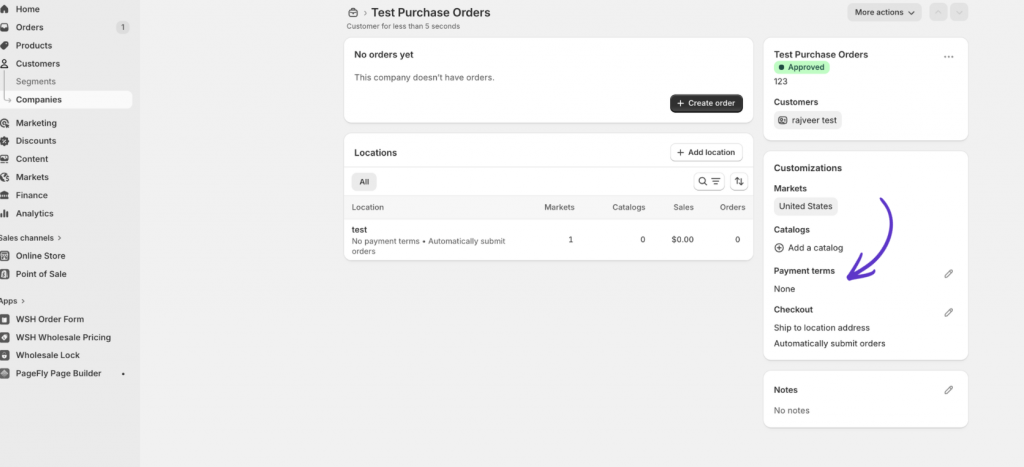
Choose the payment terms that apply to the buyer.
Shopify supports terms such as Net 7, Net 15, Net 30, Net 45, Net 60, Net 90, due on fulfillment, and fixed date for draft orders. Payment terms define how long a company has to pay for the order.
Step 3: Let the customer enter a PO number at checkout
When the B2B customer logs in and checks out, Shopify gives them the option to enter a purchase order number.
If the company location has net terms, the customer can submit the order and the order will show as payment pending. If the company is set to submit orders as drafts, the buyer submits the order for approval and the order appears in Drafts.
Step 4: Review the order or invoice
Depending on your setup, you can:
- Let approved B2B customers submit orders directly
- Require company locations to submit all orders as drafts for review
- Send an invoice after reviewing the draft order
- Let customers pay before the due date from their customer account
Shopify lets you set company locations to submit orders as drafts for review. In that case, no payment is collected at initial checkout, and you can approve the draft order before it becomes a final order.
Option 2: Create a manual “Pay by Purchase Order” payment method
Use this if you are not using full native B2B setup, or if you want a simple PO-style payment option.
From Shopify admin, go to:
Settings > Payments > Manual payment methods > Create custom payment method
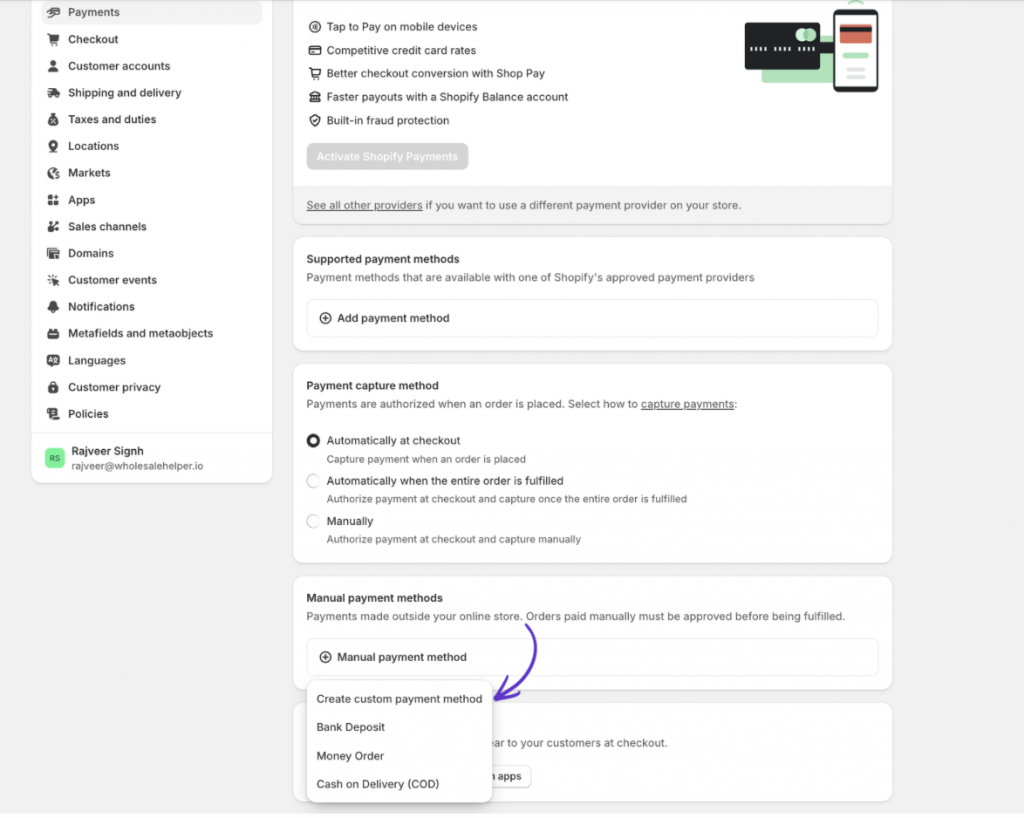
Name the method something clear, such as:
- Pay by Purchase Order
- Purchase Order, approved accounts only
- Invoice payment, approved B2B accounts only
- Net 30 invoice, approved customers only
In the payment instructions, add clear rules. For example:
This payment method is only for approved wholesale or B2B accounts. Please enter your purchase order number in the order notes or send your PO document to our team after placing the order. Orders may be delayed or cancelled if the account is not approved for PO payment.
Shopify’s manual payment method instructions appear on the order confirmation page after the customer completes checkout. Orders paid through manual methods are marked as pending until you receive the payment and manually mark the order as paid.
Real-World Example: An Eco Cleaning Supply Brand
A cleaning supply brand sells bulk products to offices, schools, and public institutions.
A school district is approved as a B2B company in Shopify. The company location has Net 30 payment terms and is allowed to submit orders with PO numbers.
The workflow looks like this:
- The school buyer logs in through customer accounts.
- Shopify shows the correct B2B pricing and products for that company location.
- The buyer adds bulk cleaning supplies to cart.
- At checkout, the buyer enters their PO number.
- Because the company has Net 30 terms, the order is submitted with payment pending.
- The brand reviews the order and fulfills it.
- The school’s finance team pays the invoice before the due date.
- The brand tracks outstanding payment and sends reminders when needed.
If the brand wants to review every school order before confirming it, they can set that company location to submit orders as drafts for review instead.
This gives the school the PO workflow they expect, while helping the merchant keep pricing, approval, fulfillment, and payment tracking inside Shopify.
When native B2B is not enough, Wholesale Pricing Discount B2B is the next step.
Try our Wholesale Pricing Discount B2B app for free !
Trusted by over 16,000 Shopify merchants
Frequently Asked Questions
Here are common questions users have about enabling Purchase Order (PO) payment on Shopify:
Does Shopify support purchase order numbers?
Yes. Shopify B2B supports purchase order numbers. B2B customers can enter a PO number on an order, and merchants can also add PO numbers to orders or draft orders from Shopify admin.
Do I need Shopify Plus to accept purchase orders?
No, not for basic PO workflows. Shopify’s B2B feature table lists PO numbers, net terms, draft order to invoice, checkout to draft, and payment reminders across Basic, Grow, Advanced, and Plus plans. Shopify Plus is needed for advanced payment features like deposits, partial payments, and payment requests per fulfilment.
Can I create a “Pay by Purchase Order” payment method in Shopify?
Yes. You can create a custom manual payment method from Settings > Payments > Manual payment methods > Create custom payment method. Add clear instructions so customers know who can use it and how to share their PO number or PO document.
Can I hide PO payment from retail customers?
You can control this more cleanly with Shopify B2B company settings and payment terms. For blended stores, payment methods are available to all eligible customers by default, but Shopify supports payment customization through apps and checkout customization tools.
Can customers upload a PO document during checkout?
Not natively in the standard checkout flow for every store. The simpler option is to collect the PO number at checkout and ask customers to email the formal PO document after placing the order. If file upload is required, use a cart field, form app, checkout customization, or post-checkout process depending on your plan and setup.
Can I require PO orders to be reviewed before approval?
Yes. Shopify B2B lets you set company locations to submit orders as drafts for review. Customers see a submit-for-approval flow, and the draft order is not completed until you approve it or send the invoice/payment request.