The WSH Order Form & ReOrder app now includes a built-in Analytics Dashboard, giving merchants real-time visibility into how customers interact with their wholesale order forms.
What’s new
Every time a customer clicks Add to Cart on the Order Form or the ReOrder Form in your Shopify store, the app captures key data automatically. No configuration required. The result is a set of five purpose-built insights that help merchants understand purchasing behaviour, identify top products, uncover hidden wholesale leads, and measure the effectiveness of their retention strategy.
| 📌 Data collected per click: product_id, variant_id, customer_id, quantity, and source (Order Form vs. ReOrder Form). This data reflects app engagement, not finalized orders. |
The Five Analytics Features
| 1. Loyalty Pulse Enterprise Plan |
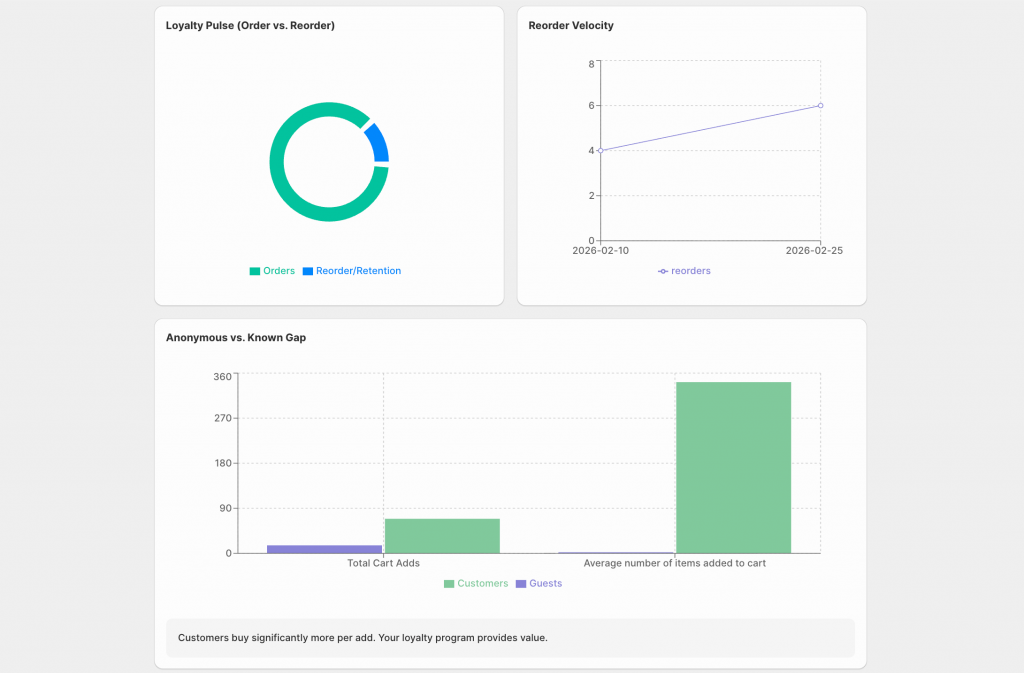
| Goal: Understand at a glance whether your store is winning new customers or keeping existing ones. Shows the percentage split between Add to Cart clicks from the Order Form (new orders) vs. the ReOrder Form (repeat orders). A high Order Form share means strong acquisition, but may signal a retention opportunity. Growing ReOrder Form activity is a direct indicator that your repeat-purchase strategy is working. |
| 2. Reorder Velocity Enterprise Plan |
| Goal: Track the trend of ReOrder Form activity over time to measure the direct impact of the app on repeat revenue. Displayed as a line graph across the selected date range. Shows whether reorder activity is growing, flat, or declining, making seasonal patterns immediately visible. Because our app manages the reorder workflow, this graph directly attributes repeat volume to the app. |
| 3. Anonymous vs. Known Gap All Plans |
| Goal: Measure the difference in purchasing behaviour between guest shoppers and logged-in customers.Compares total cart adds and average quantity per session for guests versus registered customers. If logged-in customers consistently add more items, this is concrete proof of the value of your account programme. High guest activity highlights an opportunity to drive account registrations and capture more customer data. |
| 4. Bulk Buyer Leaderboard All Plans |
| Goal: Discover which products are driving real volume, not just appearing most often in orders.Ranks products by total units added to cart, not by how many times they appeared in an order. Surfaces ‘whale’ products: a product added 10 times at qty 20 outranks one added 100 times at qty 1. Use this to prioritise restocking, negotiate supplier terms, and identify high-volume SKUs for marketing. |
| 5. Wholesale Leads All Plans |
| Goal: Find high-volume buyers in your existing customer base who are not yet on a wholesale plan. Ranks customers by total quantity added to cart over the selected period. Customers at the top behave like wholesale buyers, even if they’ve never been approached for a wholesale account. Provides a direct outreach list to convert high-volume retail customers into wholesale accounts. |
Plan Availability
| Feature | All Plans | Enterprise Only |
|---|---|---|
| Loyalty Pulse (Order vs. Reorder Split) | — | ✓ |
| Bulk Buyer Leaderboard | ✓ | — |
| Anonymous vs. Known Gap | ✓ | — |
| Wholesale Leads | ✓ | — |
| Reorder Velocity | — | ✓ |
Data Collection & Privacy
Analytics tracking is fully automatic. No setup or configuration is required. Data is captured at the moment a customer clicks Add to Cart, aggregated in the background, and surfaced in the merchant dashboard.
Help & Documentation
A full helpdesk article is now live, covering how to navigate the dashboard, interpret each widget, and troubleshoot empty states:
| How to use the Analytics Dashboard in WSH Order Form & ReOrder help.wholesalehelper.io → WSH Order Form & ReOrder → Analytics The article covers: accessing the dashboard, changing the date range, reading each widget, and FAQs on empty states and data freshness. |
What’s Next
The Wholesale Order Form Analytics Dashboard is the foundation. Planned enhancements include:
- Export to CSV / Excel for all dashboard widgets
- Configurable custom date ranges on trend-based charts
- Predictive reorder alerts based on Reorder Velocity trends
- CRM integration for wholesale lead outreach workflows
- Real-time dashboard refresh as cart events stream in
Questions about this release?
Reach out to us at themes@wholesalehelper.io for support.