Key Takeaways
- Shopify tiered pricing lets you offer lower per-unit prices when customers buy higher quantities.
- It is useful for B2B, wholesale, bulk ordering, refill products, and stores that want to increase average order value.
- Tiered pricing, volume discounts, and quantity breaks are closely related, but they are not always the same thing.
- Shopify B2B supports volume pricing and quantity rules through catalogs, including price breaks, minimum quantities, maximum quantities, and increments.
- Native B2B pricing is useful for catalog-based B2B setups, but apps are still useful when you need customer tag-based pricing, dynamic pricing tables, collection-level rules, quick order forms, or mixed B2B/B2C pricing.
- For wholesale stores, tiered pricing works best when it is clearly shown on the product page, cart, and bulk order form.
- Before launching tiered pricing, check your margins at every quantity break so larger orders do not become unprofitable.
If you are looking to increase average order value, encourage bulk purchases, or offer better pricing to wholesale customers on Shopify then tiered pricing can help. It lets you offer better per-unit pricing when customers buy in larger quantities.
In this guide, we’ll explain how Shopify tiered pricing works, how it compares with volume discounts, how to set it up using native Shopify B2B features or apps, and what to keep in mind before launching it on your store.
What is Shopify Tiered Pricing?
Shopify tiered pricing is a pricing strategy where the per-unit price changes based on the quantity purchased.
The more the customer buys, the lower the price per unit becomes.
Example:
| Quantity purchased | Price per unit |
|---|---|
| 1–14 units | $20.00 |
| 15–24 units | $18.99 |
| 25–99 units | $16.49 |
| 100+ units | $12.99 |
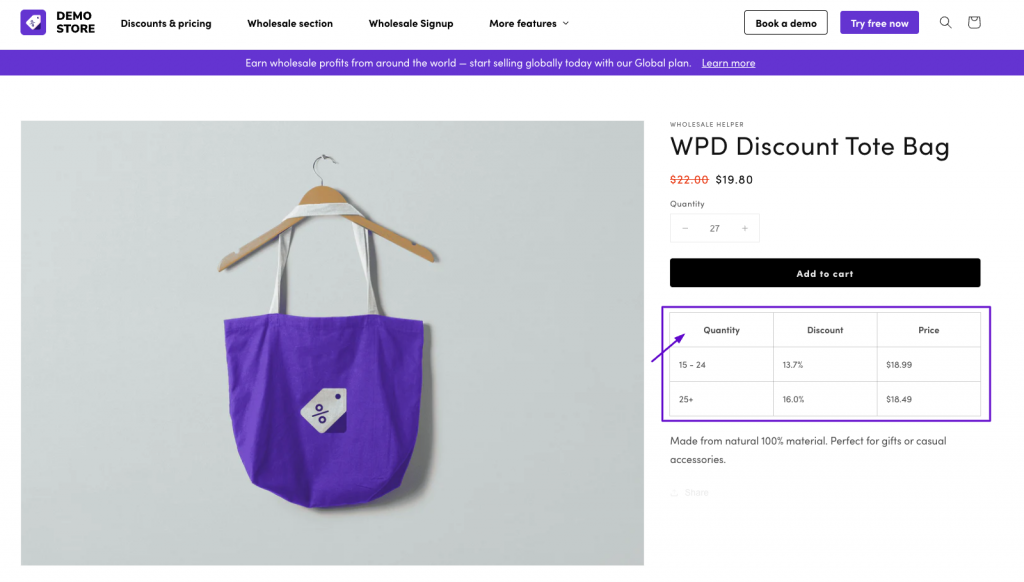
This is also called quantity breaks, tiered discounts, or volume-based pricing.
Tiered pricing can be applied in different ways:
- Per product or SKU: The discount applies to one specific product or variant.
- Across a collection: The discount applies to products inside a selected collection.
- By customer group: Wholesale buyers, VIP customers, or distributors see different tiers.
- By cart quantity or value: The discount applies when the total cart quantity or value reaches a certain threshold.
For wholesale stores, tiered pricing is useful because it gives buyers a clear reason to increase their order size.
Tiered Pricing vs Volume Discount
Many Shopify merchants get confused with these two. These terms are often used interchangeably, but they are different:
| Pricing type | How it works | Example | Best for |
|---|---|---|---|
| Tiered pricing | Price per unit changes by quantity range | Buy 10+, pay $18 per unit instead of $20 | Wholesale pricing, B2B buyers, SKU-level pricing |
| Volume discount | Discount is applied when the customer buys more or spends more | Buy 10+, get 10% off or spend $500, get $50 off | Promotions, bulk buying offers, cart-wide discounts |
| Quantity breaks | The quantity thresholds that trigger better pricing | 10+, 25+, 50+, 100+ | Product pages, wholesale pricing tables |
Simple example:
- Tiered pricing: 1–9 units = $20 each, 10–49 units = $18 each, 50+ units = $15 each.
- Volume discount: Buy 50 units and get 15% off.
- Cart value discount: Spend $500 and get $50 off.
For B2B and wholesale stores, tiered pricing is usually better when buyers need clear per-unit pricing. Volume discounts are useful when you want to encourage larger cart values. If you are planning a wholesale pricing setup, it helps to first understand how to set quantity breaks and volume discounts so your tiers are simple for buyers and profitable for your store.
Who Should Use Tiered Pricing on Shopify?
Tiered pricing is useful for any Shopify store that wants customers to buy more units or place larger orders.
It is especially useful for:
- Wholesale and B2B stores
Buyers can get better pricing when they purchase in larger quantities. - Manufacturers and distributors
Pricing can be based on case packs, cartons, pallets, or order volume. - DTC brands
Retail customers can be encouraged to buy bundles, refills, or multi-packs. - Subscription and refill businesses
Customers can be encouraged to buy larger quantities less frequently. - VIP or loyalty programs
Logged-in VIP customers can receive special pricing tiers. - Global wholesale stores
Different buyer groups can have different pricing tiers by region or currency. - Stores with repeat buyers
Returning customers can reorder more easily when pricing tiers are simple and visible.
Types of tiered pricing rules you can use on Shopify
Before setting up tiered pricing, decide what type of rule you need.
Product-level tiered pricing
This applies quantity breaks to one product.
Example: Buy 10+ units of Product A and get a lower price per unit.
Variant-level tiered pricing
This applies different quantity breaks to specific variants.
Example: The black large variant has different quantity breaks than the white small variant.
Collection-level tiered pricing
This applies quantity-based pricing to products inside a collection.
Example: Buy 25+ items from the “Wholesale Skincare” collection and get better pricing.
Customer group-based tiered pricing
This shows different pricing to different customer groups.
Example: Retail customers see regular pricing, while wholesale customers see special quantity breaks.
Cart quantity-based discount
This applies when the total cart quantity crosses a threshold.
Example: Buy 100 total units and get 15% off.
Cart value-based discount
This applies when the cart value reaches a certain amount.
Example: Spend $1,000 and get $100 off.
How to Set Up Shopify Tiered Discounts
There are three main ways to set up tiered pricing on Shopify:
- Use Shopify B2B volume pricing and quantity rules
- Use Shopify discounts
- Use a Shopify tiered pricing app
The right method depends on how advanced your pricing rules are.
Method 1: Use Shopify B2B volume pricing and quantity rules
If you are using Shopify B2B, you can set volume pricing and quantity rules inside catalogs.
This is useful when you want to offer B2B buyers different price breaks based on quantity.
With Shopify B2B catalogs, you can set:
- Volume pricing
- Quantity breaks
- Minimum order quantity
- Maximum order quantity
- Quantity increments
- Product or variant-level rules
Shopify also allows up to 10 quantity breaks when adding volume pricing through CSV, and those price breaks need to match the related quantity break.
This method is best if:
- You use Shopify B2B catalogs
- You want native B2B price breaks
- You need product or variant-level volume pricing
- You want pricing tied to companies or B2B catalogs
- You want quantity rules and volume pricing together
This method may not be enough if:
- You want dynamic pricing tables on product pages
- You want customer tag-based pricing outside native B2B
- You want collection-level tiered pricing
- You sell to both retail and wholesale customers from one flow
- You want pricing to work inside a custom quick order form
- You need more control over visibility or app-based rules
Method 2: Use Shopify discounts
Shopify’s built-in discount tools can work for simple offers.
You can create discount codes, automatic discounts, or sale prices for individual products. Shopify’s discount docs say merchants can create monetary value discounts, percentage discounts, Buy X Get Y offers, and free shipping discounts.
This can work for offers like:
- Buy 10+, get 10% off
- Spend $500, get $50 off
- Buy X, get Y
- Free shipping above a threshold
This method is best if:
- You need a simple promotional discount
- You do not need customer-specific wholesale pricing
- You do not need a visible tiered pricing table
- You do not need complex B2B pricing rules
This method may not be enough if:
- You need fixed per-unit tiered prices
- You need different pricing by customer group
- You need pricing tables on product pages
- You need wholesale-only visibility
- You need different tiers by product, variant, or collection
- You want B2B buyers to see pricing before checkout
Method 3: Use a Shopify tiered pricing app
For most wholesale and B2B stores, a dedicated tiered pricing app gives more control.
A Shopify tiered pricing app can help you:
- Set product-level pricing tiers
- Set variant-level pricing tiers
- Create customer group or tag-based pricing
- Show pricing tables on product pages
- Apply different rules for retail and wholesale buyers
- Create collection-level quantity breaks
- Combine tiered pricing with minimum order quantity
- Connect pricing with bulk order forms
- Show or hide pricing based on login status or customer type
Recommended App: Wholesale Pricing Discount B2B. This app is widely regarded for its comprehensive capabilities. It allows you to:
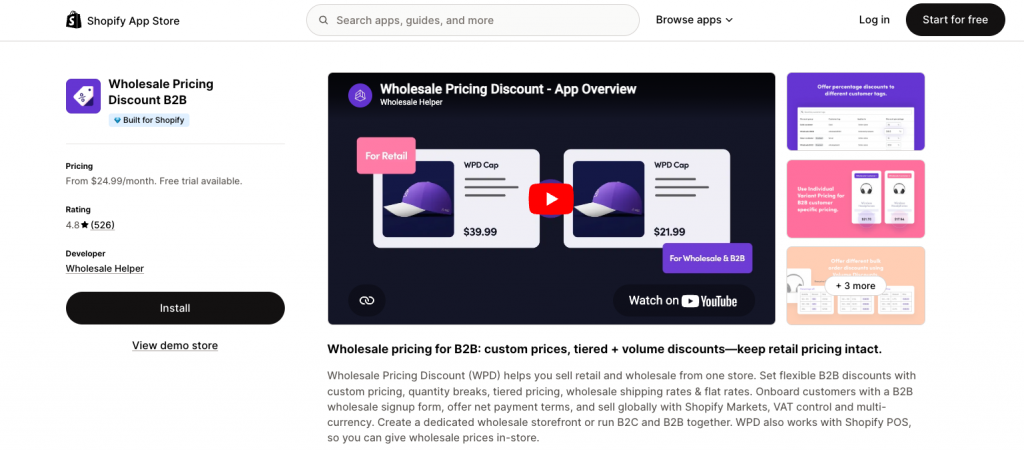
- Set tiered pricing per tag or customer group.
- Offer fixed prices or percentage discounts at specific volume breakpoints.
- Automatically adjust pricing based on quantity in the cart.
- Integrate with other crucial B2B features like Net Terms, Minimum Order Quantities (MOQs), and B2B signup forms.
- Enable you to operate an only B2B or a B2B + B2C (Wholesale and retail) combined store on Shopify.
Native Shopify B2B vs tiered pricing app
Shopify’s native B2B features are useful if you want catalog-based pricing for approved companies.
In 2026, Shopify expanded native B2B features to more merchants, including company profiles, custom catalogs with tailored pricing, volume discounts, quantity rules, vaulted credit cards, and payment terms.
However, many stores still use apps when they need more flexibility.
| Use case | Native Shopify B2B | Tiered pricing app |
|---|---|---|
| Company-specific catalogs | Good fit | Possible with app setup |
| Volume pricing in B2B catalogs | Good fit | Good fit |
| Quantity rules | Good fit | Good fit |
| Customer tag-based pricing | Limited | Strong fit |
| Dynamic pricing table on product page | Depends on theme/setup | Strong fit |
| Collection-level tiered pricing | May need workaround | Strong fit |
| Mixed B2B + B2C workflows | Possible, but setup-dependent | Strong fit |
| Quick order form integration | Limited | Strong fit with order form app |
| Hide/show pricing by customer type | Setup-dependent | Strong fit with lock/visibility apps |
| Non-technical setup | Moderate | Easier for many merchants |
Simple takeaway:
Use native Shopify B2B when your setup is mostly based on companies, catalogs, and native price breaks. Use an app when you need more flexible pricing rules, display control, customer tags, and wholesale-specific workflows.
Real-World Example: Tiered pricing for a wholesale skincare brand
Let’s say you sell skincare products to salons, clinics, and retailers.
Product: Hydrating Face Serum
Retail price: $24 per unit
Wholesale pricing tiers:
| Buyer type | Quantity | Price per unit |
|---|---|---|
| Retail customer | 1–4 units | $24 |
| Wholesale buyer | 12–47 units | $16 |
| Wholesale buyer | 48–95 units | $14 |
| Distributor | 96+ units | $11.50 |
In this setup:
- Retail customers can buy one product at the normal price.
- Approved wholesale buyers get lower per-unit pricing when they order at least 12 units.
- Larger distributors get deeper pricing at 96+ units.
- The product page shows a pricing table so buyers can see how much they save by ordering more.
- The cart updates the price when the buyer increases the quantity.
This type of setup works well for B2B because buyers can clearly understand the pricing ladder before placing an order.
Where to show tiered pricing on your Shopify store
Tiered pricing should not be hidden until checkout. Buyers should understand the pricing before they add products to cart.
Good places to show tiered pricing include:
- Product page
- Product pricing table
- Bulk order form
- Cart page
- Quick order page
- Wholesale portal
- Customer account area
- B2B catalog pages
Example product page message:
Buy 12+ units and pay $16 each.
Buy 48+ units and pay $14 each.
Buy 96+ units and pay $11.50 each.
Clear pricing reduces confusion and encourages buyers to increase their order quantity.
Best Practices for Implementing Tiered Pricing on Shopify
To make tiered pricing work well, keep the setup clear and profitable.
- Show pricing tiers clearly on the product page.
- Use simple quantity breaks like 10, 25, 50, 100, or case-pack quantities.
- Check your margins at every tier.
- Do not offer deep discounts without knowing fulfillment and shipping costs.
- Use customer groups or tags when different buyers need different pricing.
- Keep retail and wholesale pricing separate.
- Show tiered pricing inside bulk order forms when possible.
- Use MOQ with tiered pricing if you want to avoid small wholesale orders.
- Test the pricing in cart and checkout before going live.
- Make sure the pricing table works well on mobile.
- Review tier performance regularly and adjust breakpoints if buyers are not moving to higher tiers.
Recommended Shopify Tiered Pricing Apps
| Function | App | Key Benefits |
|---|---|---|
| Tiered / Volume Pricing Logic | Wholesale Pricing Discount B2B | Comprehensive tool for creating flexible, tag-based tiered pricing, quantity breaks, and volume discounts. |
| Show / Hide Tiered Pricing by Tag(s) | Wholesale Lock Manager B2B | Ensures only authorized customers see their specific tiered pricing and content, maintaining exclusivity. |
| Quick Bulk Ordering | WSH Order Form & ReOrder | Ideal for B2B customers to quickly add multiple items at their applicable tiered prices from one page. |
Final Summary
Shopify tiered pricing is a useful way to encourage larger orders and give better pricing to wholesale or bulk buyers.
You can set up tiered pricing in a few ways. Shopify B2B volume pricing and quantity rules can work well for catalog-based B2B pricing. Shopify’s built-in discounts can work for simple promotions. For more flexible rules, customer-specific pricing, product-page pricing tables, and mixed B2B/B2C workflows, a tiered pricing app is usually easier to manage.
The best setup depends on your store. If you only need simple price breaks for approved B2B companies, native Shopify B2B may be enough. If you need customer tags, collection-level rules, dynamic pricing tables, or wholesale order form integration, Wholesale Pricing Discount B2B can give you more control.
Before launching, keep your tiers simple, show them clearly, and check your margins at every breakpoint.
When native B2B is not enough, Wholesale Pricing Discount is the next step.
Try our Wholesale Pricing Discount app for free !
Trusted by over 16,000 Shopify merchants
FAQs
How do I set up tiered pricing on Shopify without Shopify Plus?
Shopify doesn’t support tiered pricing natively unless you’re on their Plus plan and you need to be familiar with scripts. Most merchants use third-party apps like Wholesale Pricing Discount (WPD) to create quantity-based pricing rules on any plan. Read more about How to Set Up Wholesale on Shopify Without Shopify Plus? [2026]
Can I offer volume discounts based on the quantity in the cart across multiple products?
Yes, but not by default. You’ll need an app that supports combined cart quantity logic to trigger discounts across variants or products grouped by tag or collection.
Can I apply tiered pricing across an entire collection of products, not just per individual SKU?
Yes. Many advanced tiered pricing apps like Wholesale Pricing Discount B2B allow you to configure volume discounts that apply to all products within a specific collection, or even across the entire store based on total cart quantity.
Can I display different tiered pricing structures for different customer types (e.g., retail vs. wholesale) on Shopify?
Yes. This is a core strength of app-based solutions. By assigning specific customer tags (like wholesale-buyer or VIP-member) to your customers, you can set up unique tiered discount ladders that only apply when those tagged customers are logged in.
Does Shopify’s native tiered pricing stack with other discount codes or promotions?
Shopify’s native automatic discounts typically do not stack with other discount codes. However, many third-party Shopify tiered discount apps offer more flexible stacking configurations, allowing you to control whether volume discounts can combine with other promotional codes.
How do Shopify tiered discounts help with international sales and multi-currency?
Yes. This is a core strength of app-based solutions. By assigning specific customer tags (like wholesale-buyer or VIP-member) to your customers, you can set up unique tiered discount ladders that only apply when those tagged customers are logged in.
How do I restrict tiered pricing to wholesale customers only?
You can use customer tags, locked pages, or B2B apps like Wholesale Lock Manager B2B to make discounted pricing visible only to logged-in wholesale customers.
Can I set up tiered pricing based on the total value of the cart, rather than just quantity?
Yes. Many advanced Shopify tiered discount apps allow you to set thresholds based on cart value (e.g., “Spend $500, get 10% off the total order,” or “Cart value above $1,000, get $150 off”), in addition to quantity-based tiers.