Key Takeaways
- Shopify Magic is Shopify’s built-in AI toolset for content, images, themes, customer support suggestions, and store productivity.
- Shopify Magic can generate text for product descriptions, blog posts, pages, Shopify Messaging emails, Shopify Inbox, and theme editor content.
- Sidekick is Shopify’s AI assistant that works inside Shopify admin and can help with guidance, content creation, data questions, store tasks, and app generation.
- Shopify Magic can also help with media generation, such as removing backgrounds, generating logos, and creating hero banners.
- AI-generated content still needs human review. Shopify clearly says merchants are responsible for the accuracy of content published to their store.
- For wholesale and B2B stores, Shopify Magic can help with product copy, emails, FAQs, and buyer-facing content, but it does not replace wholesale pricing, locked access, order forms, or B2B workflows.
Shopify Magic is Shopify’s built-in set of AI tools that helps merchants create content, improve images, generate themes, write emails, create product descriptions, and work faster inside Shopify admin.
It is not one single tool. Shopify Magic appears across different parts of Shopify, such as product descriptions, blog posts, pages, email campaigns, Shopify Inbox, the theme editor, the file editor, and Sidekick.
Sidekick is Shopify’s AI assistant. It works inside Shopify admin and helps merchants get guidance, create content, review store data, manage tasks, and make changes with approval.

In this guide, we’ll explain what Shopify Magic is, what Sidekick does, which AI features Shopify offers in 2026, and how merchants can use these tools without relying on them blindly.
What is Shopify Magic/Shopify AI?
Shopify Magic is an advanced suite of AI-powered tools developed by Shopify to assist merchants in managing their day-to-day operations in their Shopify store and it is for FREE.
Using Shopify Magic tools, merchants can make the most out of artificial intelligence to perform functions such as generating product descriptions, creating email content, editing product images, etc.
By automating these repetitive and time-consuming processes, Shopify Magic allows store owners to focus more on growing their business and less on manual tasks.
Shopify Sidekick AI Assistant
Another powerful feature under the Shopify Magic is the Shopify Sidekick AI Assistant. This tool makes it super easy for Shopify Merchants to control and customize the functionalities of their stores using simple commands in a chat assistant box.
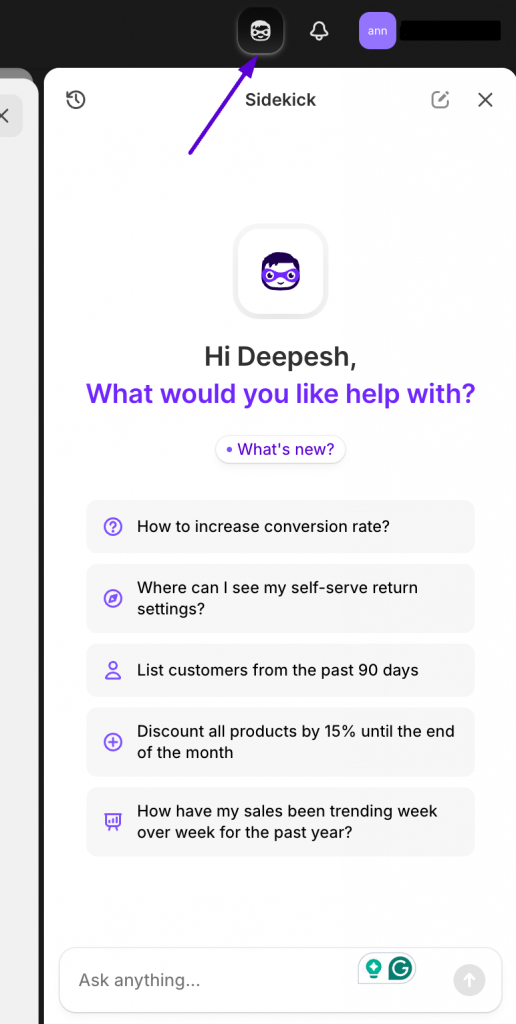
Using Sidekick, you can ask Shopify to perform tasks like managing inventory, updating product descriptions, creating basic discounts, analyzing sales data and getting insights, creating marketing content like emails and blogs, and much more.
Key features of Shopify Magic
Let us now look at some of the top features that Shopify Magic offers to store owners.
- AI-Generated Product Descriptions—Shopify Magic helps merchants create unique product descriptions that resonate with their products. It analyses product details and highlights the main points about the products. This helps you save immense time on thinking and writing product descriptions manually.
- Edit product images instantly — One of the most powerful features that Shopify Magic offers is the ability for you to edit your product images. You can transform the background of your images just by using simple prompts that you want to reflect in the background.
- Automated Email Marketing — With AI-powered insights, Shopify Magic assists in crafting personalised email campaigns using which you can create promotional offers to recover abandoned carts and also reach out to more audiences.
- Intelligent and automated customer support — Answering customer queries is faster with Shopify Magic. The AI generates instant, contextually appropriate responses to common customer questions, enhancing the support experience while reducing response time.
- Streamlined SEO Optimization — Shopify Magic helps merchants optimize their content for search engines by suggesting SEO-friendly keywords and descriptions.
- Personalized frequently asked questions — Using Shopify AI, you can create frequently asked questions that arepersonalized to your customer’s queries. This helps you to create a super engaging and trustworthy shopping experience for your customers.
- Content Creation for Marketing — The tool simplifies content generation for ads, social media posts, and marketing campaigns. Merchants can quickly produce tailored content that aligns with their brand voice.
- Integrated AI Capabilities — Shopify Magic is seamlessly embedded into your Shopify store, providing AI features exactly where you need them.
- Multi-Language Support — The AI supports content creation in multiple languages, making it easier for merchants to reach global audiences and cater to customers from diverse regions.
- Customer segment descriptions – When merchants create customer segments, Shopify Magic can generate a plain-language description of the segment for review.
- App review summaries – Shopify Magic powers app review summaries for selected apps in the Shopify App Store. This can help merchants understand common feedback before installing an app.
How Shopify Magic can help Wholesale and B2B Stores
Shopify Magic can be useful for wholesale stores, especially when you have a large catalog or need to communicate clearly with business buyers.
For example, you can use Shopify Magic to help draft:
- Product descriptions for large catalogs
- Collection page copy
- Wholesale application page content
- Dealer or distributor FAQs
- Email campaigns for approved buyers
- Product launch emails
- Reorder reminder emails
- Policy explanations
- Buyer support replies
But Shopify Magic does not replace wholesale functionality.
If your store needs customer-specific pricing, locked products, wholesale order forms, MOQ rules, payment terms, or B2B customer approval, you still need Shopify wholesale apps, or custom workflows.
Benefits of Using Shopify Magic for Merchants
There are several benefits that merchants reap when they use Shopify Magic in their day-to-day store operations. Let us have a look at some of them.
- Time-Saving Efficiency – Shopify Magic automates time-consuming tasks like writing product descriptions, creating marketing content, and managing customer communication. This allows merchants to save significant time that they would have otherwise wasted on manually working on these tasks.
- Improved Content Quality – With AI-generated, high-quality product descriptions and marketing copy, merchants can present their products more professionally and engagingly.
- Enhanced Customer Engagement – By offering personalized recommendations, tailored discounts, and targeted email campaigns, Shopify Magic helps merchants connect with their audience on a deeper level.
- Cost-Effective Marketing – Merchants can reduce reliance on external marketing
agencies or freelance writers by using Shopify Magic’s AI tools to generate marketing content. - Scalability and Global Reach – Shopify Magic’s multi-language capabilities enable merchants to expand their business into global markets without the hassle of creating localized content manually.
- Seamless Integration – Shopify AI tools integrates effortlessly with Shopify’s existing ecosystem, ensuring a smooth workflow for merchants and eliminating the need for additional third-party tools.
- Increased Conversion Rates – By offering personalized shopping experiences and creating compelling content, Shopify Magic helps merchants turn casual visitors into paying customers, thus ultimately increasing the conversion rates of their stores.
Getting Started with Shopify Magic
Let us now look at the steps that you can take to get started with some of the basic features of Shopify Magic.
Step 1: Access the Shopify Admin Panel
To begin using Shopify Magic, log in to your Shopify admin dashboard. Irrespective of the plan, Shopify AI works mainly on all paid plans.
Step 2: Explore AI Features
Navigate to key areas where Shopify Magic is available, such as product descriptions, email campaigns, or customer service automation. Look for the AI icons or options labeled “Magic” to activate these features.
Step 3: Test AI Suggestions
Before implementing AI-generated content, review the suggestions and make any necessary edits.
Step 4: Integrate AI Across Workflows
Utilize Shopify Magic in multiple workflows, such as automating product descriptions, creating personalized marketing emails, and managing customer inquiries with AI-generated responses. This ensures consistency and maximizes efficiency.
Why Shopify Magic Matters for Merchants
Shopify Magic matters because it brings AI directly into the workflows merchants already use.
Instead of switching between separate tools for product copy, emails, images, support replies, and store guidance, merchants can use AI inside Shopify admin.
That is useful for small teams because ecommerce work is repetitive. Product descriptions, image edits, customer replies, email campaigns, FAQs, and page copy all take time. Shopify Magic helps speed up those tasks.
But the real value comes when merchants combine AI with good judgment. AI can help create the first version. The merchant still needs to check whether the content is accurate, useful, and aligned with the brand.
For wholesale and B2B stores, this is even more important. Business buyers need clear product details, pricing rules, ordering instructions, payment terms, and support content. Shopify Magic can help draft that content, but the actual buying workflow still needs to be set up correctly.
Summing up
Shopify Magic exemplifies the power of AI in transforming the e-commerce landscape, providing merchants with innovative tools to simplify operations and create personalized customer experiences. From automating product descriptions to delivering tailored marketing campaigns and everything in between, Shopify Magic helps businesses save time, engage customers, and increase sales. Its seamless integration with the Shopify ecosystem ensures that merchants can leverage AI without disrupting their workflows.
By making AI accessible, scalable, and impactful, Shopify Magic empowers merchants to focus on growth and creativity while maintaining a competitive edge in an increasingly dynamic market. With Shopify Magic, businesses of all sizes can unlock new possibilities, streamline processes, and create memorable shopping experiences for their customers.
When native B2B is not enough, Wholesale Pricing Discount is the next step.
Try our Wholesale Pricing Discount B2B app for free !
Trusted by over 16,000 Shopify merchants
Frequently Asked Questions
Is Shopify Magic free?
Shopify Magic features are built into Shopify, but availability can depend on your plan, store setup, language, location, and the specific feature. Always check the feature inside your Shopify admin.
What is Shopify Sidekick?
Sidekick is Shopify’s AI assistant inside Shopify admin. It can help with guidance, content creation, store tasks, data questions, and admin workflows. Shopify says Sidekick presents changes for review before applying them.
Can Shopify Magic write product descriptions?
Yes. Shopify Magic can generate product descriptions from product details, keywords, tone, and other instructions. Shopify recommends adding enough product details so the generated description is more accurate and useful.
Can Shopify Magic edit product images?
Yes. Shopify Magic can help with media generation, including removing or replacing image backgrounds and creating assets inside Shopify’s media tools.
Is Shopify Magic accurate?
Not always. Shopify says merchants are responsible for the accuracy of content published to their store, even when automatic text generation is used. Always review AI-generated content before publishing.
Can Shopify Magic answer customer questions automatically?
Shopify Magic can help generate suggested replies and instant answer suggestions in Shopify Inbox, but merchants should still review and manage customer conversations. Sidekick itself cannot talk to customers on your behalf.