
Your wholesale buyers can now ask for your best price without leaving your store. Request a Quote is live in the WSH Order Form, ReOrder & RFQ on the Enterprise plan.
B2B buyers rarely pay list price on a big order. They want to negotiate volume, delivery dates or packaging first. Until now, that conversation happened over email and spreadsheets, and the order was keyed in by hand.
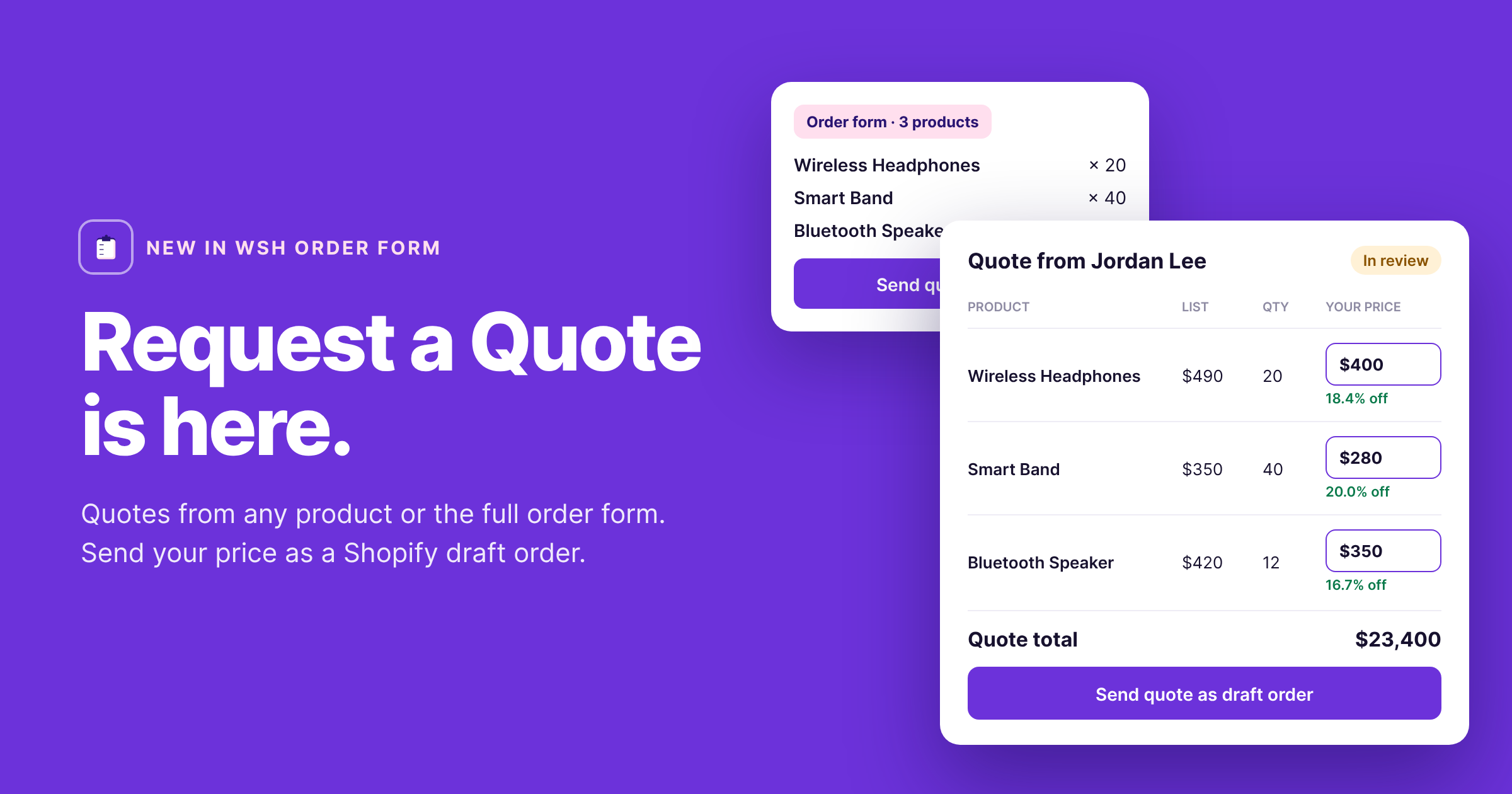
Request a Quote moves it into Shopify. Buyers send a request from a product page or straight from your wholesale order form. You set your price in the app, click Send, and the buyer gets a Shopify draft order to check out at that price.
How it works
A quote goes from request to paid order in four steps:
- The buyer requests a quote. They click Request a quote on a product page or in your order form, then enter the quantity, an optional target price, their name, email and any notes.
- You get notified. The request lands on the Quotes page in the app, and you can get an email alert for every new one.
- You set your price. Open the quote, enter your price for each product and check the totals. The app shows the discount off list as you type.
- The buyer checks out. Click Send quote. The app creates a Shopify draft order and emails it to the buyer, who pays at your price.
Two ways for buyers to ask
Use one or both. The Quotes page shows where each request came from.
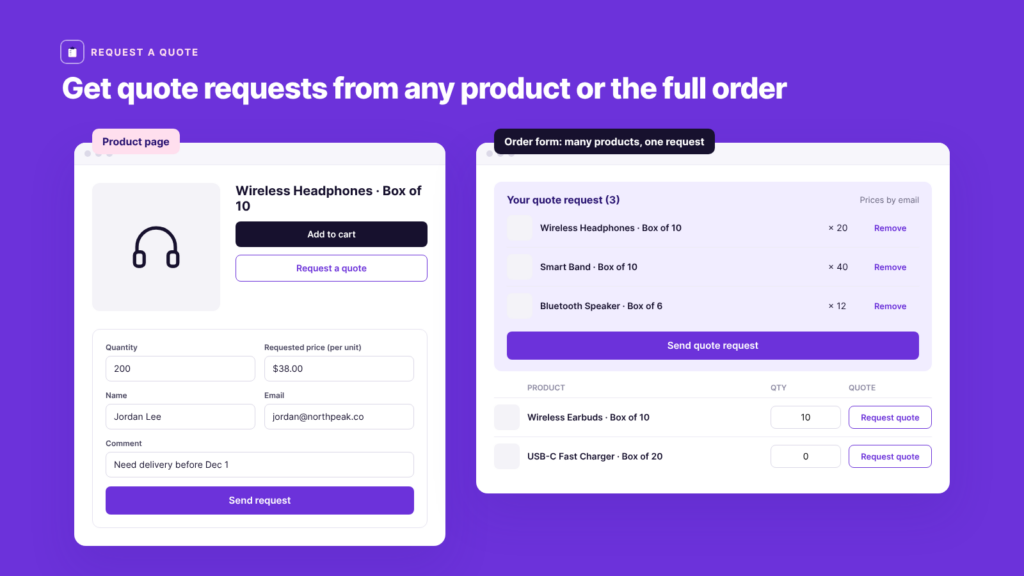
| Product page button | Order form column | |
|---|---|---|
| Best for | A single high-value or custom item | Bulk orders across many products |
| Products per request | 1 | As many as the buyer adds |
| Setup | Theme app block, added in one click | Switch on the Request quote column |
| Theme needs | Online Store 2.0 theme | Wholesale order form already on your store |
Quoting the whole order is what sets this apart. Most quote apps ask buyers to request one product at a time. With WSH Order Form, buyers build their bulk order as usual, then send it as one quote request.
One inbox for every quote
All requests live on the Quotes page in the app. Filter by status or search by customer name or email.
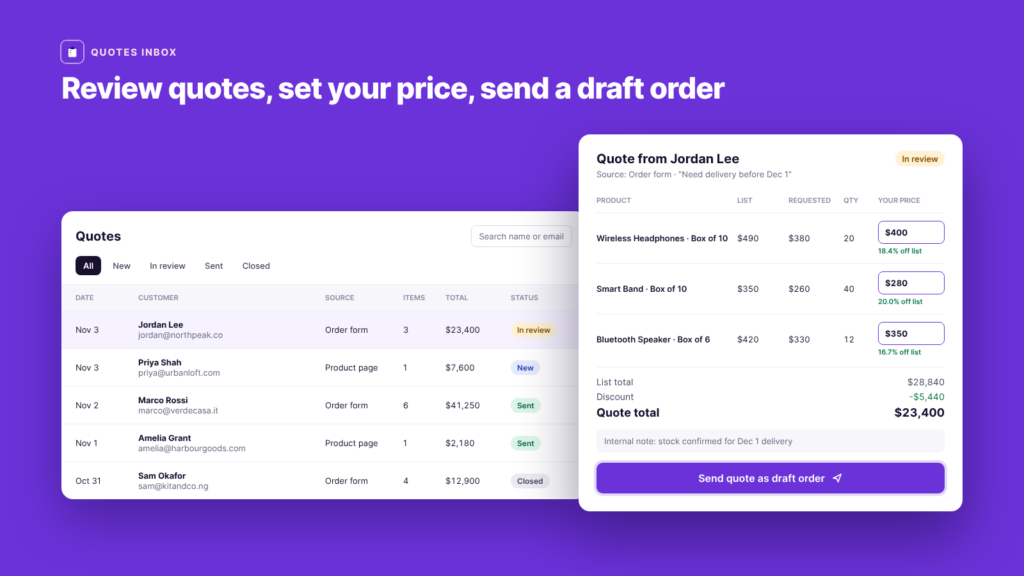
| Status | What it means |
|---|---|
| New | The request just arrived |
| In review | You are working on it, for example checking stock |
| Sent | You sent the quote and the buyer has the draft order |
| Closed | You decided not to quote |
Open a quote to see the list price, the buyer’s requested price and the quantity for each product. Enter your price, and the list total, discount and quote total update as you go. Add an internal note if you need one; the buyer never sees it.
When you click Send quote, the draft order appears under Orders > Drafts in your Shopify admin. The buyer gets Shopify’s standard draft order invoice, which you can edit under Settings > Notifications.
Settings that keep it B2B
- Only logged-in customers: visitors who aren’t logged in see a “Log in to request a quote” button instead of the form, so requests only come from approved wholesale accounts.
- Email alerts: get an email for each new request, with the buyer’s details, message and products. Reply to it to answer the buyer directly.
- Your own wording: change the button text and colors on product pages, and edit or translate every label in the order form.
Available now on Enterprise
Request a Quote is included in the Enterprise plan of WSH Order Form, ReOrder & RFQ at $24.99/month, alongside one-click reorder and the advanced analytics dashboard. There is no extra fee and no limit on quotes.
Already on Enterprise? Open the app, go to Apps > WSH Order Form > Quotes and click Show instructions. Setup takes a few minutes.
On Basic or Professional? Upgrade to Enterprise from the app’s plan page. Every paid plan comes with an 8-day free trial.
New to WSH Order Form? Install it from the Shopify App Store and start your free trial.
Full setup steps (support article): How to set up Request a Quote.
FAQs
Can buyers request a quote for several products at once?
Yes, from the order form. The product page button sends a request for one product.
Can I offer a different price than the buyer asked for?
Yes. Change Your price on any product before you click Send quote.
Can I change the quantity?
No. Only the price can be edited. If the buyer wants a different quantity, ask them to send a new request.
How do I decline a quote?
Set its status to Closed. The buyer is not notified automatically, so reply to them directly.
How does the buyer pay?
They get a Shopify draft order by email and check out from it at your price.
Does it work with Wholesale Pricing Discount and Wholesale Lock Manager?
Yes. All three apps work together on the same store.
Questions? Chat with us or email themes@wholesalehelper.io.