Key Takeaways
What’s the most important thing to fix on your store to get visibile in the ChatGPT and AI search?
Ensure important pages aren’t blocked in your robots.txt file, then make product and policy pages easy to read and cite and add a schema markup.
What are the key steps to make your Shopify store show up in ChatGPT?
Make sure ChatGPT can crawl your site (robots.txt.liquid), improve product pages so they’re easy to quote, add/clean up JSON-LD structured data, strengthen trust pages like shipping/returns, and track ChatGPT visitors in GA4 (views, add to cart, purchases).
What Shopify pages help most for ChatGPT Search visibility?
Product pages, collection pages, shipping policy, returns policy, sizing/fit guide, and a strong About and Contact page—these are the pages AI tools cite when people ask buying questions.
Does schema help a Shopify store show up in AI answers?
Yes. Product schema (with Offer, price, availability) and FAQ schema help machines extract accurate details like pricing, stock status, delivery timelines, and return rules.
How do you track traffic from ChatGPT to Shopify?
Use GA4 (Traffic acquisition) and look for “chatgpt” in source/medium, then measure conversions on AI-driven sessions and the pages they land on.
Optimizing a Shopify store for ChatGPT isn’t optional anymore—shoppers are already using AI assistants like ChatGPT and Perplexity to research products and decide what to buy. That means your store can now get discovered inside AI answers, not just on Google.
Adobe recently reported that traffic to retail ecommerce sites from generative AI tools jumped 693.4% YoY and consumers spent $257.8 billion during the 2025 holiday season—still small overall, but growing fast.
If your pages are easy for AI tools to access, understand, and reference, you’re more likely to show up when shoppers ask questions. Here’s a simple, practical checklist to optimize a Shopify store for ChatGPT and AI search.
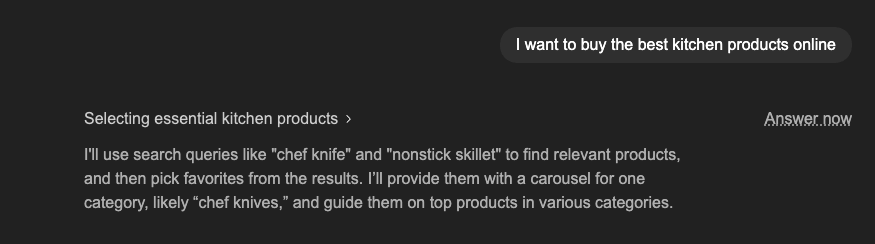
What “ranking in ChatGPT” actually means for Shopify stores
There are two main ways your Shopify store shows up inside ChatGPT:
1. ChatGPT Search (with citations/links): When ChatGPT decides to use web search, it can pull fresh pages and show sources. OpenAI explicitly says any public website can appear in ChatGPT search, and recommends not blocking their search crawler if you want content to be discovered and cited.
2. General answers without live browsing: Even when it’s not searching, clear, structured, “explainable” pages (FAQs, policies, guides) tend to be the ones people copy/paste, bookmark, and reference later—so they still matter.
So the goal isn’t a magic “ChatGPT tag.” The goal is: make your key pages crawlable + readable + unambiguous.
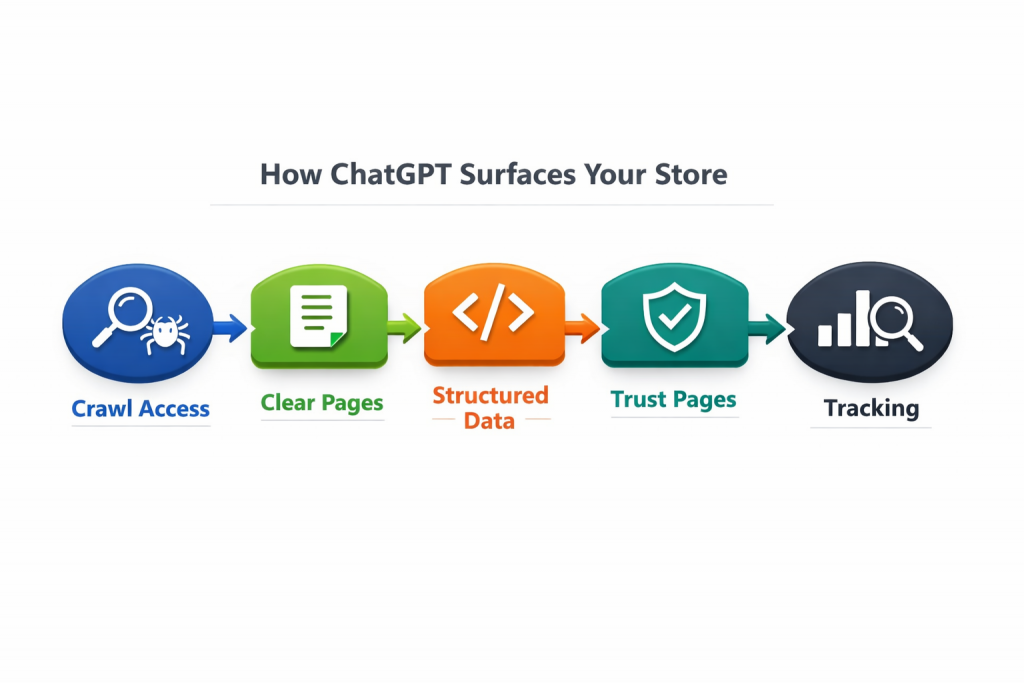
Step 1: Allow ChatGPT crawlers (robots.txt.liquid)
Before doing anything, ensure that ChatGPT has access to your store. If its crawlers can’t read your pages, your content won’t get discovered or cited.
OpenAI recommends ensuring OAI-SearchBot isn’t blocked in your Shopify store’s robots.txt file.
Do these quick checks for your Shopify store:
- Verify if your Shopify theme or apps are not blocking AI bots in the
robots.txtfile. - Ensure that you haven’t inadvertently set a sitewide
noindexdirective during testing and forgotten to remove it. - Check if your important pages, such as wholesale portals or locked pricing pages, require a login, as bots cannot access these pages.
- Make sure your key public pages (like your homepage, collections, product pages, blog, and policy pages) are easily crawlable.
- Use
noindexonly for limited or duplicate content, such as internal search results, uncurated tag pages, or filtered duplicates.
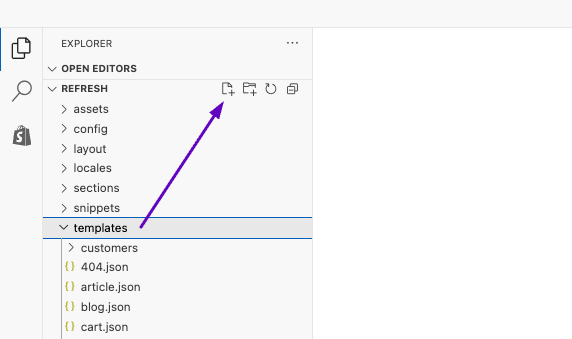
You can create/edit your robot.txt file by going to Shopify Admin > Online Store > Themes > Your theme > Edit code > Templates > click Add a new file icon (check the image above) > name it asrobots.txt.liquid > Press Enter > Paste the following code and Save:
{%- comment -%}
robots.txt.liquid for Shopify
- Custom allow for OAI-SearchBot (ChatGPT Search crawler)
- Keeps Shopify default rules (recommended)
- Adds extra rules for common thin/duplicate URLs (for User-agent: *)
{%- endcomment -%}

# --- Custom group: allow OpenAI's search crawler ---
User-agent: OAI-SearchBot
Allow: /
Sitemap: {{ shop.url }}/sitemap.xml

{%- for group in robots.default_groups -%}
{{- group.user_agent -}}

{%- for rule in group.rules -%}
{{- rule -}}
{%- endfor -%}

{%- if group.user_agent.value == '*' -%}
{{ 'Disallow: /search' }}
{{ 'Disallow: /*?q=*' }}
{%- endif -%}

{%- if group.sitemap != blank -%}
{{- group.sitemap -}}
{%- endif -%}

{%- endfor -%}
Step 2: Make product pages easy for ChatGPT to quote
This is where most Shopify stores win in the AI search. Since product pages are the most important ones in a store, here’s how you can optimize product pages for getting visible on ChatGPT as a Product carousel, like this:
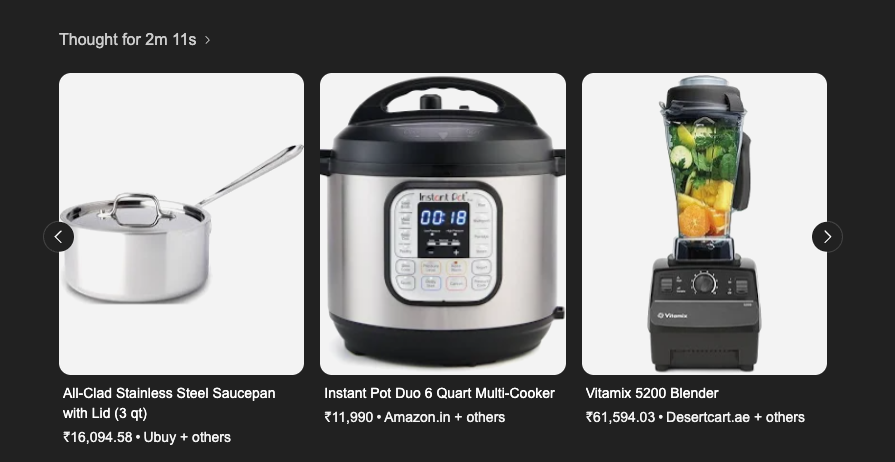
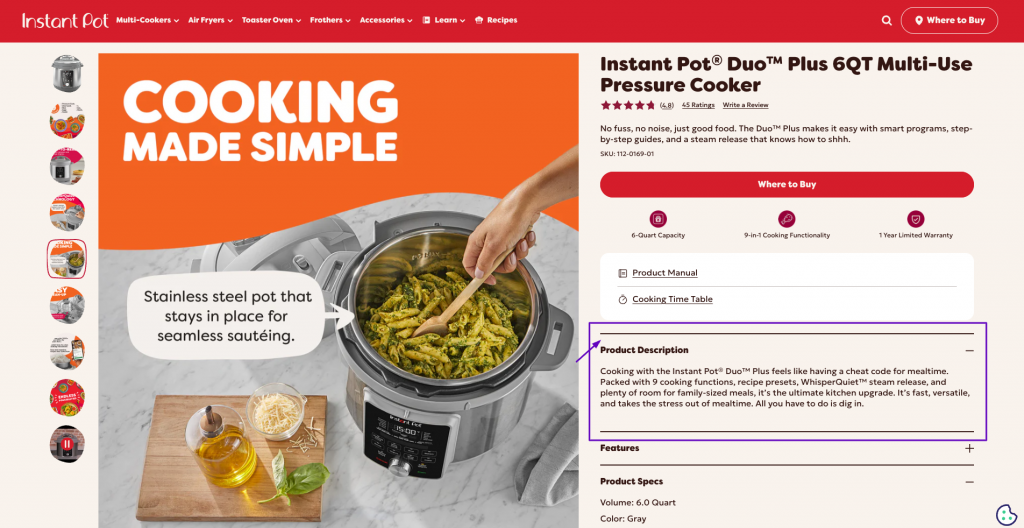
- Add a clear one-line answer under key sections like Shipping, Returns, Sizing, Materials, etc. This makes the section easy for ChatGPT to quote.
Example: H2: Shipping to Canada
First sentence: “We ship from the US to Canada in 4–8 business days, and duties may apply at delivery.” - In the first 2–3 lines of the product description, say exactly what it is + who it’s for + key trait.
Example: “A lightweight carry-on backpack for 1–3 day trips, with a laptop sleeve and water-resistant fabric.” - ChatGPT is more likely to pull details that are visible in the page content.
Keep these clearly readable:- delivery timelines (by region if needed)
- return window and conditions
- warranty
- sizing/fit rules
- Add a small product FAQ block: 4–6 questions max, focused on objections and fit.
Once product pages are solid, move outward:
- Collections: one-liner summary + “best for” bullets + internal links to 5–10 key products
- Policies: shipping/returns/warranty pages written in plain language + FAQ schema
- Buying guides: “How to choose ” and “ vs ___” pages (these get cited a lot)
- Trust pages: About + Contact + Order tracking info (this helps recommendation confidence – Check Step 4 for more information)
Step 3: Add or fix structured data (JSON-LD)
OpenAI’s crawlers help your pages get found and cited, but structured data is what helps machines understand your pages without guessing. It’s like giving ChatGPT (and other search systems) a clean label for what each page is about. You don’t need to overdo it—just start with the basics that matter most for ecommerce.
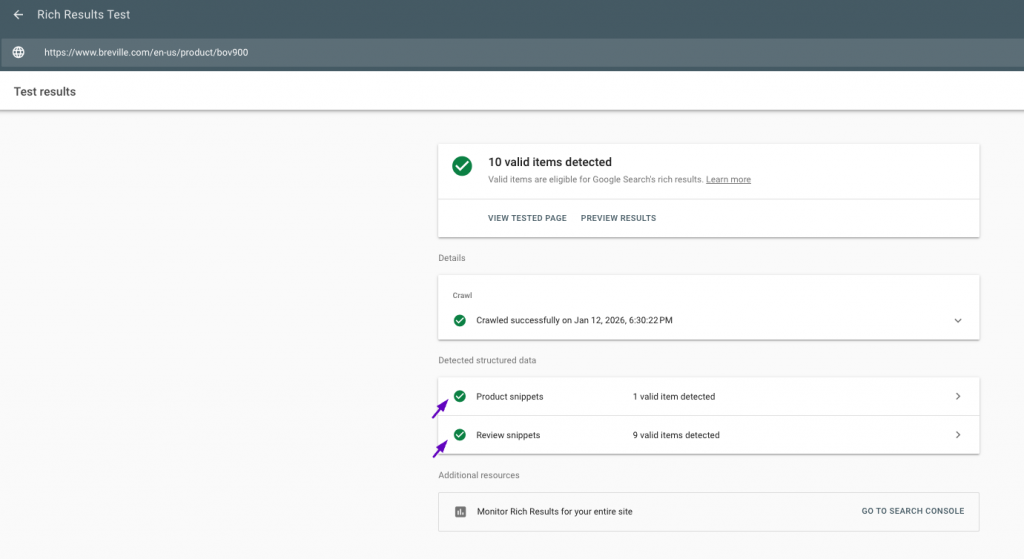
Many Shopify themes automatically insert schemas to their respective pages. To verify this for your Shopify store, insert your ‘specific’ page URL in a schema validation tool like Google’s Rich Results Test. If you don’t find it, then do the following:
Prioritize adding your structured data like this:
- Implement product schema (with offers, price, currency, availability)
- Organization schema for your brand
- BreadcrumbList for navigation context
- FAQPage schema on high-intent support pages like shipping, returns, and sizing.
For more information on implementing structured data in Shopify, you can check this article published by Shopify. OpenAI also recommends having ‘price’, ‘product’, and ‘description’ in structured data, as mentioned in their article on Shopping with ChatGPT search.
For example, if a shopper says their budget is $30, ChatGPT will usually prioritize price-related options. If they don’t mention price at all, it may weigh other factors more heavily. That’s why it helps to include accurate pricing details in your structured data.
Additionally, if you don’t have time to implement structured schemas on your store, simply install an AI SEO app from the Shopify App Store, and that should help you with this.
Step 4: Strengthen trust pages (shipping, returns, sizing)
Another important aspect of getting your Shopify store visible in AI search is having relevant information on your website. When ChatGPT recommends a store, it’s trying not to send users somewhere sketchy. So you need clear, trustworthy information about the products and services you’re selling.
These “trust pages” are often what decide whether your store gets cited and recommended.
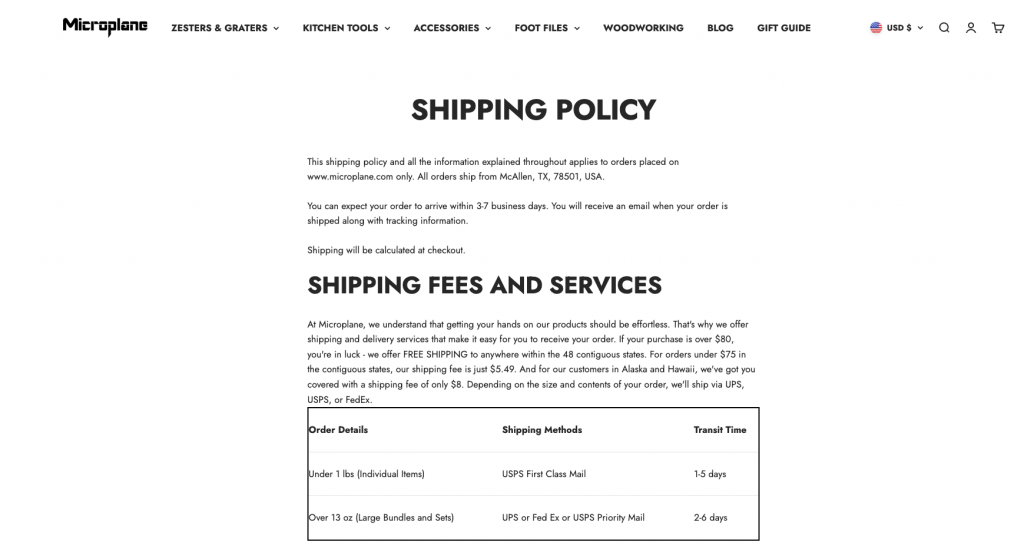
Here are the top five trust pages you should optimize for ChatGPT:
- Shipping page: Clearly mention where you ship from. Add a simple table of shipping regions and delivery times. List shipping costs by threshold or region. Include a short note about duties and taxes. And add a small section answering, “What if my order is delayed?”
- Returns & Exchanges page: Be specific about the return window, the conditions (unused, tags on, original packaging, etc.), and how the process works step by step. Don’t make customers guess what happens after they submit a return request.
- Sizing guide: Add fit rules and real examples. For example, “If you’re between sizes, size up,” or “This runs slightly slim in the shoulders.” The goal is to reduce uncertainty before purchase.
- Materials & Care page: Explain what your product is made of and how to maintain it. This helps buyers trust the quality and helps AI assistants describe your products accurately.
- Buying guide / Comparison page: Create a simple “how to choose” guide, or compare product A vs product B. These pages are often what people (and AI) look for when they’re close to deciding.
Step 5: Measure ChatGPT traffic in GA4 (view → cart → purchase)
This is the step where you measure whether your store optimization is working—specifically, whether your products, collections, and pages are getting visits from ChatGPT and other AI tools, and whether those visitors are taking action.
To do this, you need GA4 set up and connected to your Shopify store. If it’s not connected yet, install the Google & YouTube app from the Shopify App Store > go to Sales channels > open the app > connect your store to your Google account (GA4). Google has a support guide you can follow for the setup.
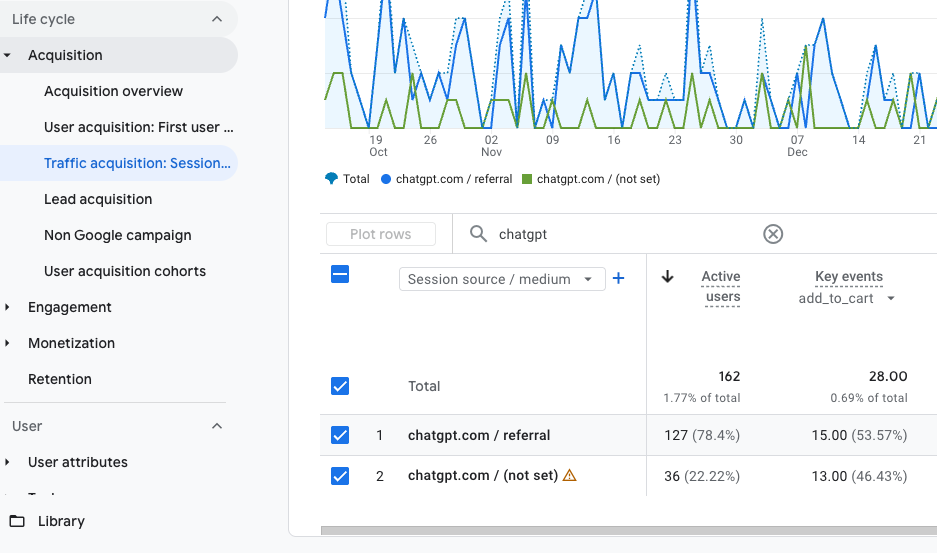
Once GA4 is ready, here’s how to check ChatGPT performance:
- How many visitors came from ChatGPT
- GA4 > Reports > Acquisition > Traffic acquisition
- Dimension: Session source/medium
- Search: chatgpt
- Which product pages did ChatGPT visitors view
- GA4 > Reports > Engagement > Landing page
- Filter: Session source/medium contains ChatGPT
- Look for URLs containing /products/
- Whether ChatGPT visitors added to the cart or purchased
- GA4 > Reports > Engagement > Events
- Filter: Session source/medium contains ChatGPT
- Check events: add_to_cart and purchase (and revenue, if you track it.
Also check these referrers too (many stores see them): perplexity, copilot, gemini, claude
Note: Not all AI tools pass referrers consistently. So some AI-driven visits may show up as Direct or (not set). That doesn’t mean you aren’t getting AI traffic—it just means attribution won’t be perfect every time.
Bottom Line
Optimizing your Shopify store for ChatGPT doesn’t have to be complicated—you’ve already done the key work to make your store easier to find and easier to recommend.
Just keep the basics tight – product pages that clearly explain what you sell, shipping and returns info that’s easy to scan, and structured data that stays clean. Then make it a habit to check GA4 once a week to see which pages AI visitors are landing on—and whether they’re adding to cart or buying.
The goal isn’t to collect random mentions. It’s to answer real buyer questions and turn that visibility into sales.


![Top 11 Wholesale Suppliers In the USA [in 2024]](https://wholesalehelper.io/blog/wp-content/uploads/2024/09/Top-11-Wholesale-Suppliers-In-the-USA-in-2024-1-150x150.png)