Quick Answer
You can build a dealer portal on Shopify in 2026 using native Shopify B2B features, wholesale apps, or a mix of both.
If you use native Shopify B2B features, you can create companies, assign catalogs, offer payment terms, set quantity rules, and let approved buyers place self-serve B2B orders. Shopify also allows new B2B customers to request access using company account request forms through Shopify Forms.
If you need more flexible dealer workflows, apps like Wholesale Pricing Discount B2B, Wholesale Lock Manager B2B, and WSH Order Form & ReOrder can help you manage customer tag-based pricing, gated products, dealer-only pages, bulk order forms, and reorder flows.
For many stores, the best setup is not native B2B or apps only. It is a mix of Shopify’s built-in B2B features and purpose-built wholesale apps.
Key Takeaways
- A Shopify dealer portal gives approved dealers, distributors, or B2B buyers a private buying experience inside your store.
- A good dealer portal usually includes dealer login, account approval, custom pricing, restricted products, bulk ordering, payment terms, and reorder options.
- You can build a dealer portal on Shopify using native B2B features, wholesale apps, or a mix of both.
- Shopify B2B now supports company profiles, catalogs, payment terms, quantity rules, volume pricing, self-serve ordering, and company account requests depending on your plan and setup.
- Shopify Forms can be used to collect company account requests from new B2B buyers.
- Apps are still useful when you need customer tag-based pricing, login-based locking, quick order forms, regional rules, custom approval flows, or more flexible dealer portal control.
- The best dealer portal setup is the one that keeps retail customers, dealers, distributors, and sales reps on the right pricing and ordering flow.
What is a Shopify dealer portal?
A Shopify dealer portal is a private buying area for approved dealers, distributors, stockists, resellers, or wholesale customers.
Instead of showing every customer the same products, pricing, and payment options, a dealer portal lets you create a separate buying experience for business buyers.
A dealer portal can include:
- Dealer login
- Dealer application form
- Account approval workflow
- Dealer-only products or collections
- Custom pricing
- Volume discounts
- Minimum order rules
- Bulk order forms
- Net payment terms
- Reorder options
- Downloadable product sheets or marketing assets
This helps you sell retail and wholesale from the same Shopify store without confusing customer types.
Why a Dedicated Dealer Portal Matters for Your Shopify Store
B2B buyers including, wholesalers and distributors, have different needs compared to retail customers. They often require:
- Discounted pricing such as bulk or tiered pricing
- Early access to the exclusive products
- Partial payment terms like Net 30, Net 60, Net 90
- Faster reordering workflows
- Downloadable B2B invoicing or PDF reciepts
- Order history and Global market support
Trying to manage both retail and wholesale customers through the same storefron, without segmentation, can create friction. Common issues include:
- Retail buyers seeing wholesale prices
- Dealers placing orders without approval
- Confusing checkout and pricing workflows for both customer types
This can be solved by a dedicated dealer portal, that utilises customer tags or login-based controls to tailor pricing, workflows, and access based on the type of customer.
Native Shopify B2B vs dealer portal apps
Shopify’s native B2B features are useful when your dealer portal is built around companies, catalogs, payment terms, and self-serve ordering.
You can also use Shopify B2B catalogs to offer custom pricing, quantity rules, and volume pricing for wholesale customers.
However, apps can still be useful when you need more control over access, pricing, and ordering flows.
| Use case | Native Shopify B2B | Dealer portal apps |
|---|---|---|
| Company profiles | Strong fit | Can support through tags/forms |
| B2B catalogs | Limited | Can support with pricing/visibility rules |
| Payment terms | Strong fit | Can support with app workflows |
| Quantity rules and volume pricing | Strong fit | Strong fit |
| Dealer-only pages or content | Limited/theme-dependent | Strong fit |
| Login-based product locking | Setup-dependent | Strong fit |
| Customer tag-based pricing | Limited | Strong fit |
| Quick order form | Limited | Strong fit |
| Reorder from one page | Limited | Strong fit |
| Mixed retail + dealer rules | Possible | Strong fit |
| Custom approval workflows | Possible with Forms/Flow | Strong fit with apps |
| Regional dealer experiences | Plan/setup-dependent | Strong fit with tags and rules |
Simple takeaway:
Use native Shopify B2B if your dealer portal is mostly about companies, catalogs, quantity rules, payment terms, and self-serve B2B ordering. Use apps when you need stronger control over gated access, customer tags, pricing visibility, quick order forms, and dealer-specific content.
How to Build a Dealer Portal on Shopify (Step-by-Step)
A dealer portal does not need to be complicated from day one. Start with the basics: dealer application, approval, pricing, product access, ordering, and payment terms.
Step 1: Create a dealer application or company account request form
To create a separate dealer login on your Shopify store, you need to add a dealer Signup and Login form to your Shopfy store that lets potential dealers apply for B2B access.

If you are using Shopify B2B, Shopify Forms can be used to create company account request forms for new B2B customers. Shopify’s documentation says merchants can use Shopify Forms to let new B2B customers request access to the online store.
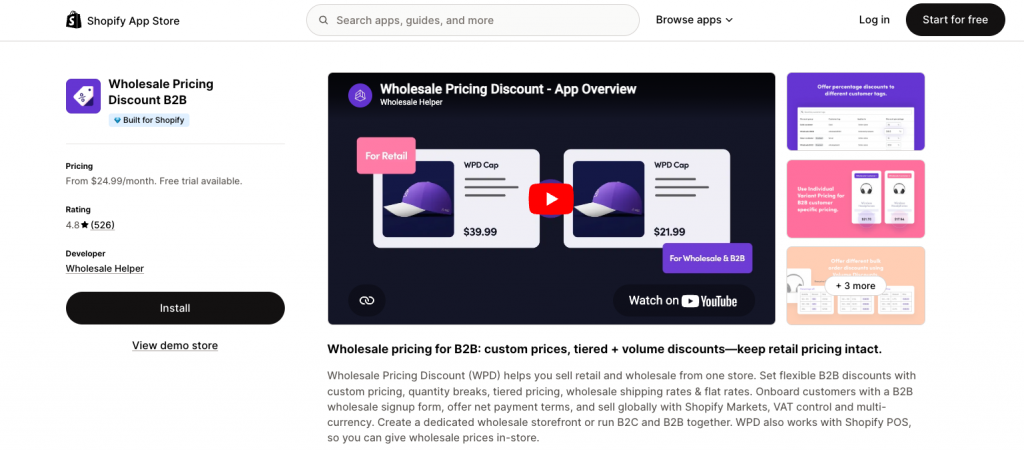
If you need a more customized application flow, you can use a wholesale signup form through Wholesale Pricing Discount B2B or a form builder app.
Step 2: Approve dealers and assign the right account type
After a dealer applies, review the application before giving access. You can approve dealers based on:
- Business type
- Location
- Resale certificate or tax details
- Expected order volume
- Product fit
- Distribution channel
- Payment eligibility
If you are using Shopify B2B, you can associate the customer with a company and a company location. A customer needs to be associated with one or more company locations to sign in as a B2B customer.
If you are using an app-based setup, you can assign customer tags such as:
dealer-approveddistributor-tier-1wholesalenet-30-eligibleb2b-usab2b-ukvip-dealer
These tags can control pricing, product visibility, payment options, and content access.
Dealers should ideally go through an approval process before accessing pricing. To implement this securely, see our guide on How to Set Up B2B Customer Approval on Shopify. This article explains how to build approval workflows using tags, forms, and locking mechanisms.
Step 3: Restrict Access to the Dealer-Only Content
A dealer portal should make sure only approved buyers can access private products, pricing, and resources.
You may want to restrict:
- Dealer-only products
- Wholesale collections
- Price lists
- Training materials
- Product data sheets
- Marketing assets
- Dealer onboarding pages
- Warranty or support resources
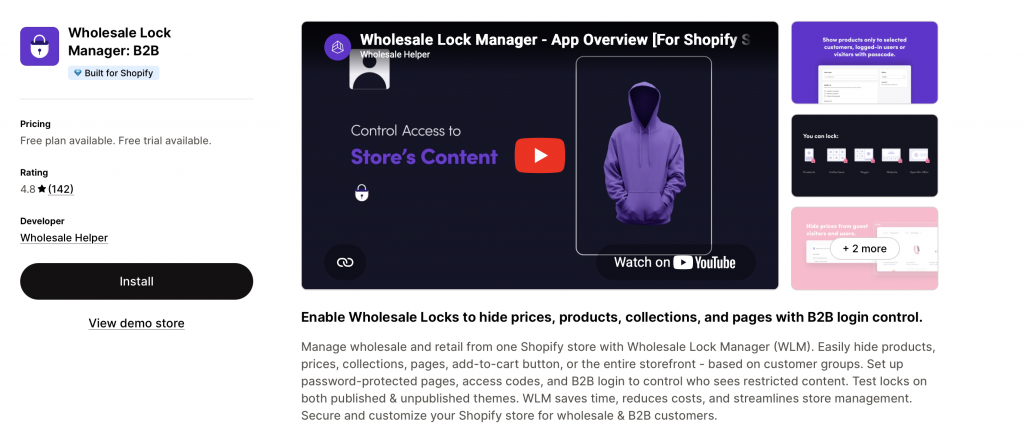
You can manage this through native B2B catalogs, theme logic, password-protected pages, or an access control app like Wholesale Lock Manager B2B.
If your main need is to hide products, collections, pages, or pricing based on login status or customer tags, Wholesale Lock Manager B2B is usually the easier option.
Step 4: Set Up Custom Dealer Pricing
As mentioned earlier, once B2B customers are approved and tagged, you can assign them special pricing or discounts that differ from what retail customers see. Apps like Wholesale Pricing Discount B2B can help you set custom pricing to specific products or collections, ensuring only tagged B2B buyers have access to these exclusive offers.
Further the app lets you,
- Assign custom pricing per tag or account
- Offer volume/tiered discounts
- Set Minimum Order Quantities or minimum cart totals
- Display dealer pricing only after login
For example, Dealers tagged distributor-tier-2 might see $80/unit instead of $120 MSRP
Step 5: Offer a Faster Ordering Experience (Optional)
Further, to perfect your dealer portal on Shopify or make it more personalized and CRO friendly to increase your average order volume and repeat orders, your can offer a faster ordering experience to them.
You can implement this on your store with a dealer-specific order form (bulk order form) that:
- Lists all products with SKUs, inventory, and price on a single page
- Lets buyers input quantities in-line
- Enables easy reorders of past purchases
Step 6: Control Checkout and Payment Options
For approved dealers, you also might want to:
- Offer Net Payment Terms (e.g., Net 30)
- Allow draft order workflows
- Offer items in bundles or subscription basis
- Offer multiple product options such as colors, sizes, addons, etc.
- Use “Pay Later” logic or offline invoicing
You can do all this by integrating other third-party apps available on the Shopify App Store. Just make sure that they integrate easily and are compatible with each other.
By following these six steps with easily help you build a perfect dealer or distributor portal on Shopify and invite your B2B buyers to purchase in bulk from your store.
What a Shopify Dealer Portal Typically Includes (Feature Matrix)
| Feature | How it works | Why it matters |
|---|---|---|
| Dealer application form | Shopify Forms, wholesale signup form, or form builder | Lets new dealers request access |
| Account approval | Shopify companies, customer tags, or Shopify Flow | Keeps private pricing limited to approved buyers |
| Dealer-only products | B2B catalogs, product locks, or collection locks | Prevents retail customers from seeing private products |
| Custom pricing | B2B catalogs, customer tags, or wholesale pricing app | Shows the right price to each dealer tier |
| Volume discounts | B2B volume pricing or pricing app | Encourages larger orders |
| MOQ and increments | Quantity rules or MOQ app rules | Keeps dealer orders profitable |
| Bulk order form | Quick order or reorder app | Helps dealers place large orders faster |
| Net payment terms | Shopify B2B payment terms or payment apps | Supports approved buyers who pay later |
| Regional rules | Company location, markets, tags, or app rules | Helps manage different countries, currencies, and taxes |
| Dealer resources | Locked pages or gated content | Gives dealers access to product sheets and marketing assets |
| Reorder flow | Customer accounts or reorder app | Makes repeat buying easier |
Real-World Shopify Dealer Portal Example
Imagine a brand based in the USA, specializing in artisanal home decor, serving both individual retail buyers and institutional hotel suppliers globally.
Current Setup:
- Public Site: Showcases standard retail prices for individual consumers in USD
- Dealer Access:
- A hotel supplier in Dubai (tagged b2b-uae, wholesale-tier-2) logs into the portal.
- They see hidden product collections featuring industrial-grade furniture and exclusive bulk textiles.
- Pricing is adjusted based on their wholesale-tier-2 tag, with a Minimum Order Quantity (MOQ) of $1000 USD (or equivalent AED).
- At checkout, the “Pay by Invoice” option with “Net 60 terms” is enabled only for this b2b-uae tagged customer.
- The portal provides access to downloadable marketing brochures for their region.
This setup ensures that the USA based brand can efficiently serve its diverse customer base without confusion, optimizing workflows for both local and international wholesale and b2b partners.
Essential App Stack for Your Shopify Dealer Portal (Optional but Highly Recommended)
To maximise functionality and efficiency, consider these apps:
| Use Case | Suggested Tool | Benefits for your Shopify Distributor Portal |
| Tag-based custom pricing | Wholesale Pricing Discount B2B | Allows granular price control per tag, essential for tiered and regional pricing, volume discounts, net terms and more |
| Gated content & access | Wholesale Lock Manager B2B | Ensures only approved, tagged dealers see exclusive content. Crucial for segmentation. |
| Bulk/Quick ordering | WSH Order Form & ReOrder | Streamlines high-volume purchases, improves B2B customer experience globally. |
| Workflow automation | Shopify Flow | Automates customer tagging based on application details, increasing efficiency. |
| International payments | Third-party payment gateways | Integrate local payment methods relevant to your dealer base (e.g., PayU in India, SEPA in Europe, etc). |
Dealer Portal Setup on Shopify – Quick Checklist
Before launching your dealer portal, check the following:
- Dealer application form is live
- Approval process is clear
- Dealer tags or company profiles are set correctly
- Dealer-only products are hidden from retail customers
- Dealer pricing is showing only to approved buyers
- MOQ and volume pricing rules are working
- Bulk order form is tested
- Payment terms are assigned correctly
- Shipping rules are clear
- Dealer resources are locked or gated
- Test account has been created for each dealer tier
- Cart and checkout have been tested on desktop and mobile
- Internal team knows how to approve and manage dealers
Final Summary for your Shopify Dealer Portal
A Shopify dealer portal helps approved dealers, distributors, and B2B buyers access the right products, pricing, payment options, and resources from one place.
In 2026, you can build this in a few ways. Shopify’s native B2B features can help with companies, catalogs, payment terms, quantity rules, and self-serve ordering. Apps can help when you need more flexible access control, customer tag-based pricing, gated content, quick order forms, or dealer-specific workflows.
If you want to build a dealer portal without custom development, Wholesale Pricing Discount B2B, Wholesale Lock Manager B2B, and WSH Order Form & ReOrder can help you create a more complete dealer experience on Shopify.
When native B2B is not enough, Wholesale Pricing Discount is the next step.
Try our Wholesale Pricing Discount app for free !
Trusted by over 16,000 Shopify merchants
Frequently Asked Questions (FAQ) for Your Shopify Dealer Portal
Do I need Shopify Plus to build a dealer portal?
Not always. Shopify B2B is now available on Basic, Grow, Advanced, and Plus plans, with features depending on your plan. Apps can also help you build dealer pricing, gated access, and bulk order workflows without custom development.
How do I let dealers request access to my Shopify store?
You can use Shopify Forms to create a company account request form, or you can use a wholesale signup form app. The form should collect company details, contact information, tax ID, resale certificate, region, and expected order volume.
How do I show different pricing to dealers?
You can show different pricing to dealers using Shopify B2B catalogs, customer tags, customer groups, or wholesale pricing apps. The right method depends on whether your pricing is based on companies, tags, regions, product groups, or order volume.
Will retail shoppers accidentally see dealer-specific pricing or content?
No, if your access control rules and customer tagging are configured correctly. Only logged-in customers with the appropriate “dealer” tags will be able to view their specific pricing, products, or payment options.
Can I create different portals for various regions or pricing tiers?
Absolutely. By leveraging specific customer tags like dealer-uk, distributor-tier-2, or b2b-california, you can tailor product visibility, pricing, and payment options to create highly customised experiences for different regions or customer segments.
How can I manage local tax compliance for my international dealers?
Shopify’s tax settings, combined with region-specific customer tags, allow you to manage various tax rules. For complex scenarios, dedicated tax apps or consulting with a local tax professional is recommended. Some wholesale pricing apps can also help display prices inclusive or exclusive of local taxes based on the dealer’s region.