Key Takeaways
- Combining discounts on Shopify allows your customers to use more than one discount on the same order.
- Shopify discounts are grouped into discount classes: product discounts, order discounts, and shipping discounts.
- You can combine discount codes and automatic discounts, but each discount must be configured to allow combinations.
- Shopify can combine product discounts, order discounts, and free shipping discounts depending on the combination settings.
- Not every discount combination is available to every store. Product + order and order + order combinations are limited to eligible merchants.
- Shopify Plus merchants can configure two product discounts to apply to the same item using discount tags and the GraphQL Admin API. Otherwise, Shopify applies the best eligible discount when product discounts conflict.
- For wholesale stores, discount combinations are useful for volume discounts, customer-specific pricing, free shipping, bulk order incentives, and B2B promotions.
- If you need advanced discount logic, customer-specific pricing, tiered discounts, or wholesale rules, a Shopify discount app may be easier than managing everything manually.
Shopify lets merchants combine eligible discounts across product, order, and shipping discount types. You can use this to create better promotions, but you also need to set the rules carefully so discounts do not stack in a way that hurts your margins.
In this guide, we’ll explain how Shopify discount combinations work, what types of discounts can be combined, how to set them up, and what to keep in mind if you run a wholesale or B2B store.
What is Combining Discounts on Shopify?
Combining discounts on Shopify means allowing customers to use more than one eligible discount on the same order.
For example, a customer may get:
- 10% off selected products
- $20 off the total order
- Free shipping
Shopify groups discounts into three main classes:
| Discount class | What it applies to | Example |
|---|---|---|
| Product discount | Specific products or variants | 10% off selected products |
| Order discount | The full cart or order subtotal | $20 off orders above $200 |
| Shipping discount | Shipping cost | Free shipping above $100 |
When you create a discount in Shopify, you can choose whether it can combine with other discount classes. Shopify’s own documentation says merchants can set up both automatic discounts and discount codes to combine, and each discount belongs to a class depending on what it applies to.
Why is it important to combine discounts in the ecommerce industry?
There are many benefits to offering combined discounts on your store that help enhance your sales strategy and increase average order value. You can either configure automated discounts on your store OR you can allowyour customers to apply their discounts manually with discount codes.
Additionally, you can combine multiple discounts on Shopify and make it as a part of your Shopify loyalty program. Doing this will encourage your customers to shop more frequently on your store and build a lasting relationship with your brand.
With so much competition in the ecommerce industry, store owners need to find creative ways to display and market their brands on the Internet to quickly capture the attention of potential customers. And, combining discounts is one effective way to do this.
Types of discounts available on Shopify
Shopify offers merchants 4 types of discount settings:
- Amount off products
- Buy X get Y
- Amount off order
- Free shipping

Types of discount ‘combinations’ available on Shopify
In Shopify admin, when merchants/customers create discounts, it falls under these discount categories such as Product discounts, Order discounts, and Shipping discounts. We’ll learn more about how to set these discounts later in this article (below).

When you create a discount (code) for an order, you can combine this discount with any of the categories mentioned above. For example, if you create a discount code for free shipping, you can combine this discount code with 20% off on a specific product. So this becomes a combination of Shipping discount + Product discount.
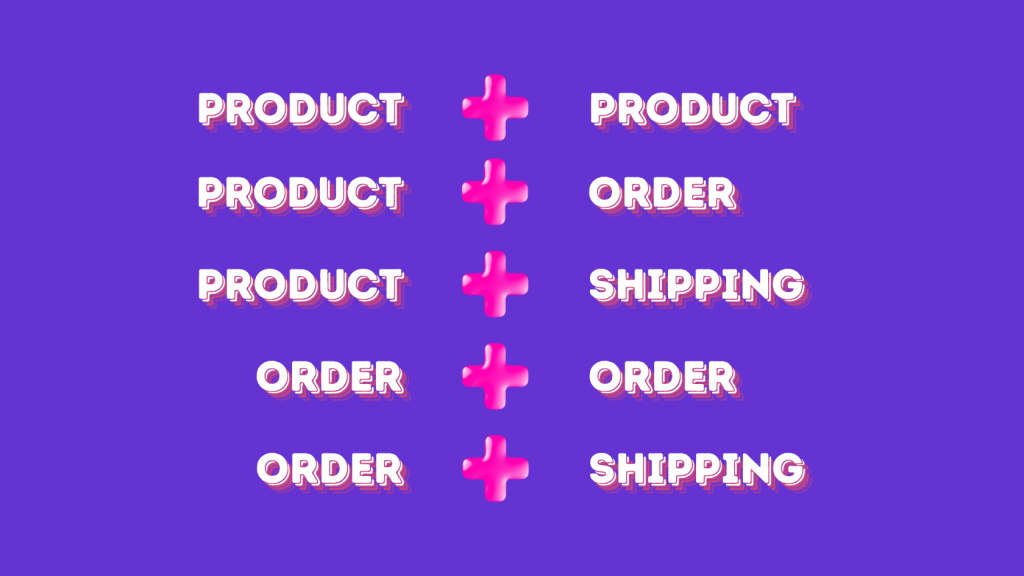
Here are the common discount combinations you can create in Shopify.
- Product discounts with other product discounts on separate items
- Product discounts with free shipping discounts
- Order discounts with free shipping discounts
- Product discounts with order discounts
- Order discounts with other order discounts
- Product discounts with other product discounts on the same item
Product discounts on separate items, product discounts with free shipping, and order discounts with free shipping are available to all merchants. Product + order and order + order combinations are available only to eligible merchants. The store must not use checkout.liquid customizations or features and must not use the Licensify app.
Combining two product discounts on the same item is available only on Shopify Plus. It requires discount tags and configuration through Shopify’s GraphQL Admin API. A product discount, order discount, and free shipping discount can also apply to the same order when all three discounts are eligible and configured to combine.
How to implement combined discounts on Shopify?
A. Product + Product
A product + product discount combination means more than one product discount can apply in the same order.
For example:
- 10% off Product A
- 15% off Product B
If the customer buys both products, both discounts can apply to the order as long as the discounts are eligible and the combination settings allow it. This is useful when you want to promote multiple collections or product groups at the same time.
Product discounts that apply to separate items can be combined on all Shopify plans. For example, one discount can apply to Product A while another applies to Product B in the same order.
Shopify Plus merchants can now configure multiple product discounts to apply to the same item. For example, a percentage discount and a fixed amount discount could both apply to one product.
This is not enabled through the normal combination checkboxes alone. The discounts must have tags, and the permitted combinations must be configured using Shopify’s GraphQL Admin API. On other plans, Shopify applies the best eligible product discount when multiple product discounts target the same item.
How to combine product + product discounts:
- In Shopify admin, go to Discounts.
- Click Create discount.
- Choose Amount off products.
- Create your first product discount.
- In the Combinations section, allow it to combine with product discounts if available.
- Create the second product discount.
- Make sure the second discount also allows the right combination.
- Test the cart with eligible products before publishing the offer.

B. Product + Free Shipping
A product + free shipping combination lets customers receive a product discount and free shipping on the same order.
For example:
- 20% off selected products
- Free shipping on orders above $100
This works well when you want to promote specific products but also remove shipping friction at checkout.
How to combine product + free shipping discounts:
- In Shopify admin, go to Discounts.
- Create a product discount using Amount off products.
- In the Combinations section, allow the product discount to combine with shipping discounts.
- Create a free shipping discount.
- In the free shipping discount’s Combinations section, allow it to combine with product discounts.
- Add any minimum purchase requirement if needed.
- Test the cart to make sure both discounts apply correctly.


C. Product + Order
A product + order discount combination lets customers receive a discount on specific products and another discount on the full order.
For example:
- 10% off selected products
- $25 off orders above $250
This is useful when you want to promote specific products while also encouraging a higher cart value.
How to combine product + order discounts:
- In Shopify admin, go to Discounts.
- Create an Amount off products discount.
- Allow it to combine with order discounts.
- Create an Amount off order discount.
- Allow it to combine with product discounts.
- Add minimum purchase or customer eligibility rules if needed.
- Test the cart with eligible products and order value.


D. Order + Free Shipping
An order + free shipping combination lets customers receive a cart-level discount and free shipping together.
For example:
- $50 off orders above $500
- Free shipping on orders above $500
This can work well for larger orders because the customer gets both a price incentive and a shipping incentive.
How to combine order + free shipping discounts:
- In Shopify admin, go to Discounts.
- Create an Amount off order discount.
- Allow it to combine with shipping discounts.
- Create a Free shipping discount.
- Allow it to combine with order discounts.
- Add minimum order value rules if needed.
- Test the cart and checkout experience.

E. Order + Order
To combine an Order discount with another Order discount, you need to have at least 2 Order discounts created.
Order + order combinations are available only to eligible merchants. Your store must not use checkout.liquid customizations or features and must not use the Licensify app. Both order discounts must also be configured to allow combinations with other order discounts.
To do this combination, follow the steps mentioned just above for Order + Shipping and click on the Order discounts checkbox (as shown in below screenshot)

And, save all your settings by clicking on the Save button. There you go.
Discount codes vs automatic discounts
Shopify lets you create both discount codes and automatic discounts.
| Type | How it works | Best for |
|---|---|---|
| Discount code | Customer enters a code at checkout | Targeted campaigns, influencer codes, email offers, customer-specific offers |
| Automatic discount | Discount applies automatically when conditions are met | Sitewide offers, bulk discounts, cart value offers, free shipping thresholds |
Discount codes give you more control and tracking. Automatic discounts reduce friction because customers do not need to enter a code.
You can use both, but make sure the combination settings are correct. If an automatic discount and a discount code are not eligible to combine, Shopify will only apply the best eligible discount.
Shopify’s discount documentation confirms merchants can create discount codes, automatic discounts, and sale prices for individual products.
Best practices for creating effective and profitable discount combinations
Combining discounts can increase conversions, but it can also reduce margins if the rules are not planned properly. Here are some best practices:
- Know the best time – This could be during seasonal sales, holidays, or even during slow business periods.
- Use as an upsell opportunity – Offer a discount on a bundle of products or a certain minimum order amount to encourage customers to purchase more at once.
- Make a strategy – Instead of offering blanket discount on entire store, choose specific products or categories that you want to promote or need a sales boost.
- Use tiered discounts for larger orders – Offering volume discounts or tiered pricing will not only encourage customers to buy more but also will help increase your store’s average order value (AOV).
- Combine discounts with limited-time offers – To boost the effectiveness of your discounts, consider adding a time limitation to them. This will create a sense of urgency and scarcity, encouraging customers to act quickly before the offer expires.
Combining discounts for wholesale and B2B stores
Wholesale stores need to be more careful with discount combinations because wholesale pricing already has lower margins.
For example, a wholesale buyer may already receive customer-specific pricing or volume discounts. If they also receive an order discount and free shipping, the final margin can become too low.
For wholesale stores, it is better to create clear rules such as:
- Volume discounts only for approved wholesale customers
- Free shipping only above a minimum order value
- Discount codes only for selected customer groups
- Product discounts only on selected collections
- Net terms only for approved buyers
- Separate retail and wholesale promotions
Shopify’s Spring ’26 update also introduced Discounts by Market. Merchants on Basic plans and above who use the new version of Shopify Markets can assign automatic discounts and discount codes to selected markets.
These can include regional markets, retail location markets, and B2B company location markets. For example, a merchant can create a wholesale promotion that applies only to B2B buyers without making the same discount available to retail customers.
This is useful for stores that manage retail and wholesale customers from the same Shopify store.
If your store needs customer-specific pricing, volume discounts, or wholesale-only rules, it may help to compare top B2B apps for wholesale pricing and tiers on Shopify before deciding how to manage customer-specific discounts.
Conclusion
Shopify discount combinations can help you create better promotions by allowing eligible product, order, and shipping discounts to work together.
You can use combinations such as product + order, product + free shipping, order + order, and order + free shipping. However, some combinations depend on your store’s eligibility. Shopify Plus merchants can also configure multiple product discounts to apply to the same item using discount tags and the GraphQL Admin API.
Before launching any combined discount, check the discount type, combination settings, customer eligibility, minimum purchase rules, and final margin impact.
For regular stores, discount combinations can help increase conversions and average order value. For wholesale stores, they should be used more carefully because wholesale pricing already includes lower margins.
If you need more control over customer-specific pricing, volume discounts, or wholesale-only discount rules, using a Shopify wholesale pricing app can make the setup easier.
When native B2B is not enough, Wholesale Pricing Discount is the next step.
Try our Wholesale Pricing Discount app for free !
Trusted by over 16,000 Shopify merchants
Frequently Asked Questions
Can you combine discounts on Shopify?
Yes. Shopify lets merchants combine eligible discounts, including product discounts, order discounts, and shipping discounts. The discounts must be set up to allow combinations.
What types of discounts can be combined on Shopify?
Shopify supports product discounts with other product discounts, product discounts with order discounts, product discounts with free shipping, order discounts with other order discounts, and order discounts with free shipping.
Product + order and order + order combinations are available only to eligible merchants. Combining two product discounts on the same item is available only on Shopify Plus and requires discount tags and Admin API configuration.
Can customers use a discount code and an automatic discount together?
Yes, but only if both discounts are eligible and configured to combine. If they are not set up to combine, Shopify will apply the best eligible discount.
Why are my Shopify discounts not combining?
Your discounts may not combine if the combination settings are not enabled, the customer does not meet the eligibility rules, the minimum order value is not met, the discount has expired, or another discount gives a better eligible result.
Can I combine discounts for wholesale customers?
Yes, but you should be careful. Wholesale pricing already has lower margins, so combining discounts with wholesale prices can reduce profit quickly. Use customer eligibility, minimum order values, and wholesale-only rules to control this.
How do I protect margins when combining discounts?
Use minimum order values, customer eligibility, usage limits, product exclusions, and clear discount rules. Always test the final cart value before launching the promotion.