Key Takeaways
- As of April 2026, Shopify now lets merchants on Basic, Grow, and Advanced plans create B2B catalogues natively. You get up to 3 active catalogues across all B2B markets. Each catalogue can include specific products, percentage-based price adjustments, fixed prices per variant, quantity rules, and volume pricing.
- If you need more than 3 catalogues, per customer pricing, or features like partial payments and deposits, those are locked behind Shopify Plus at $2,300 per month. Apps like Wholesale Pricing Discount (WPD) remove those limits on any plan, starting at just $25 per month.
- Non Plus catalogue assignment works through Shopify Markets, not directly to individual companies. That matters if you price differently for each buyer.
- The native setup takes about 15 to 20 minutes for a basic catalogue. The app route is similar but gives you more control over discount types, customer tagging, shipping rules, and tax display from the start.
Running wholesale and retail from the same store used to mean workarounds. Hidden collections, duplicate products, discount codes emailed around and more. Shopify changed that in April 2026 when they rolled out native B2B catalogue features to all paid plans and not just Plus anymore.
This guide covers how to set up the B2B Catalogue in Shopify, both the native way and the app way. What works, what falls short, and which process makes sense for your store.
What Is a B2B Catalogue in Shopify
A B2B catalogue in Shopify controls two things: which products a wholesale buyer can see, and what price they pay.
Think of it as a custom version of your store that only appears when a logged-in B2B customer visits. Retail visitors see your regular pricing, whereas wholesale buyers see specific catalogue pricing.
Each catalogue can include all products or just a selected set (Collections). You can apply a percentage discount across everything. Or you can set fixed prices on specific products and variants. Both can exist in the same catalogue.
Shopify also lets you add quantity rules to catalogues. Minimum order quantities, maximum limits, and case pack increments. Volume pricing is available too, so you can offer price breaks when buyers order in bulk.
If a buyer has access to multiple catalogues that contain the same product, the store shows the lowest price automatically.
Who Needs a B2B Catalogue in Shopify
Not every store selling to businesses needs a B2B Catalogue in Shopify. If you have 5 wholesale accounts and everyone gets the same 20% off, a simple discount code or customer tag discount still works fine.
Catalogues start making sense when your wholesale operation involves any of the following.
- Different pricing for different buyers: A regional distributor paying one rate and a single location retailer paying another.
- Product restrictions: Some SKUs only go to wholesale and should never appear for retail customers.
- Quantity controls: Minimum order requirements per product or variant level case pack rules.
- Volume pricing tiers: Price per unit drops as the order size goes up.
If you only need one or two of these, the native Shopify catalogue might be enough. If you need all of them across more than 3 customer segments, you are going to hit the wall quickly without Shopify wholesale apps or Plus.
How to Set Up a B2B Catalogue in Shopify (Native Method)
Here is the step by step walkthrough using Shopify’s built in B2B catalogue feature. This works on Basic ($39/mo), Grow, Advanced, and Plus plans.
Step 1: Create a Company
Go to Customers in your Shopify admin. Click on Companies. Add a new company with the business name, contact information, and at least one company location.
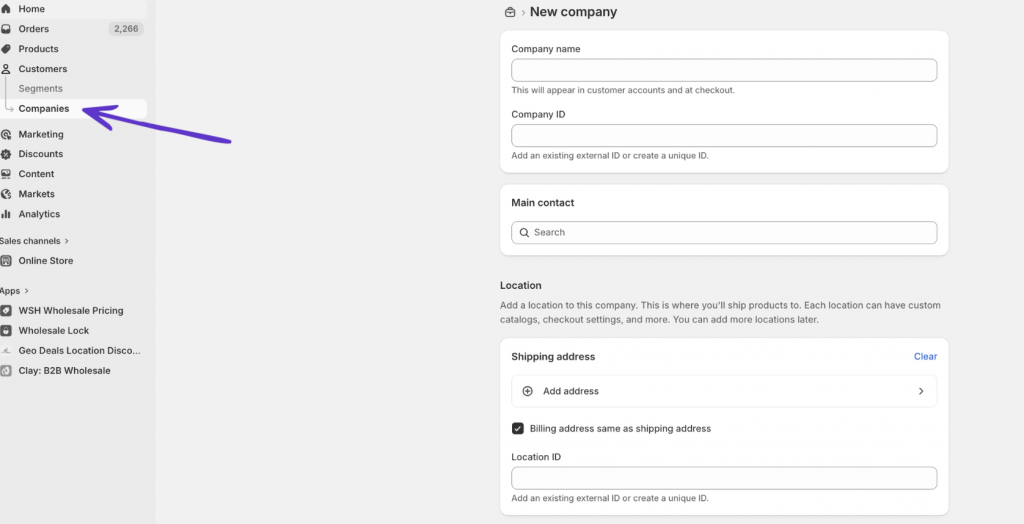
Each company represents a wholesale buyer. Locations are where they ship to or operate from. You can add multiple locations under one company.
Step 2: Create a New Catalogue
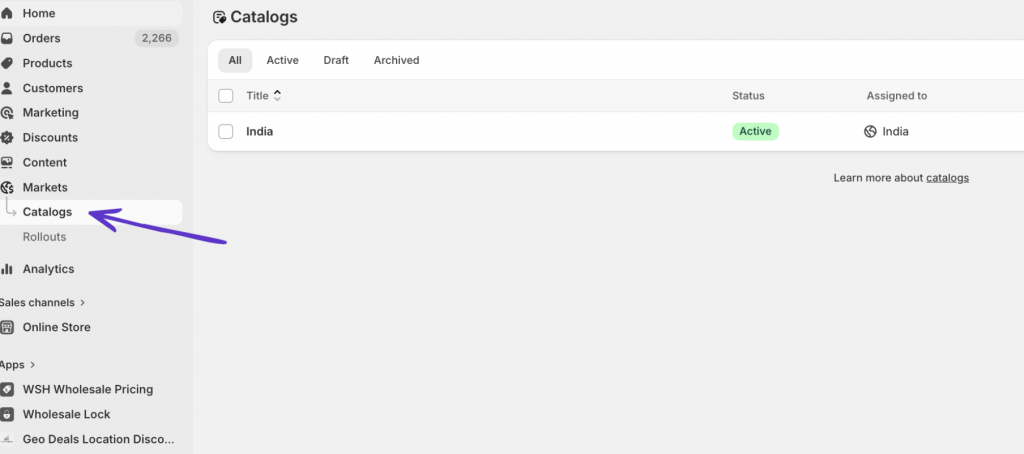
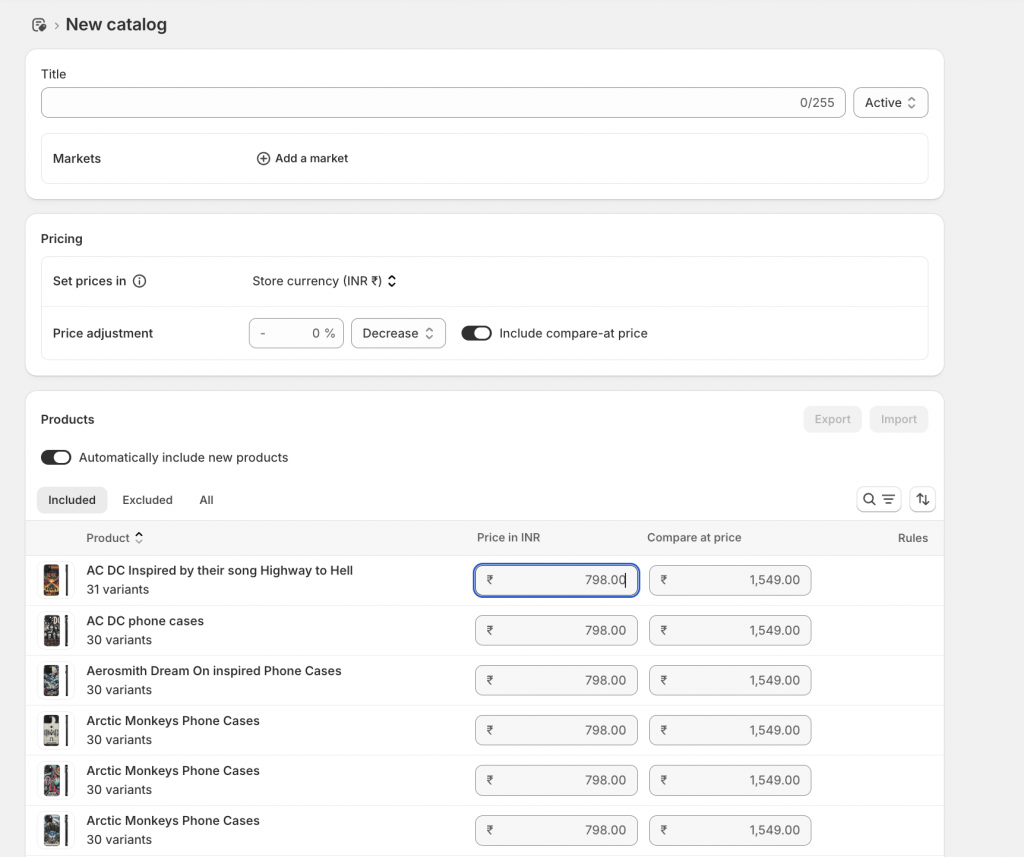
Navigate to Markets, then Catalogues in your admin. Click Create catalogues. Give it a name that makes sense internally. Something like “Tier 1 Wholesale” or “Regional Distributors” works.
Step 3: Select Products
Choose which products to include. You can include everything in your store or pick specific products and collections. If you run a blended store (DTC and B2B together), this is where you control what wholesale buyers can see.
Products you exclude from the catalogue will not appear for B2B customers assigned to it.
Step 4: Set Pricing
You have two options here.
Overall adjustment. Set a percentage discount that applies to every product in the catalogue. Enter a value like negative 25 and all prices drop by 25% for buyers using this catalogue.
Fixed prices. Override the percentage on specific products or variants. If one product has thin margins, give it a fixed wholesale price instead of the blanket discount.
Step 5: Assign the Catalogue to a Market
On non Plus plans, you assign catalogues to B2B markets, not directly to individual companies. Go to your catalogue settings and link it to the relevant market.
Remember: 3 active catalogues total across all B2B markets. Assigning all 3 to one market uses your entire limit.
On Plus, you can assign catalogues directly to specific company locations and create unlimited catalogues.
Step 7: Set Payment Terms
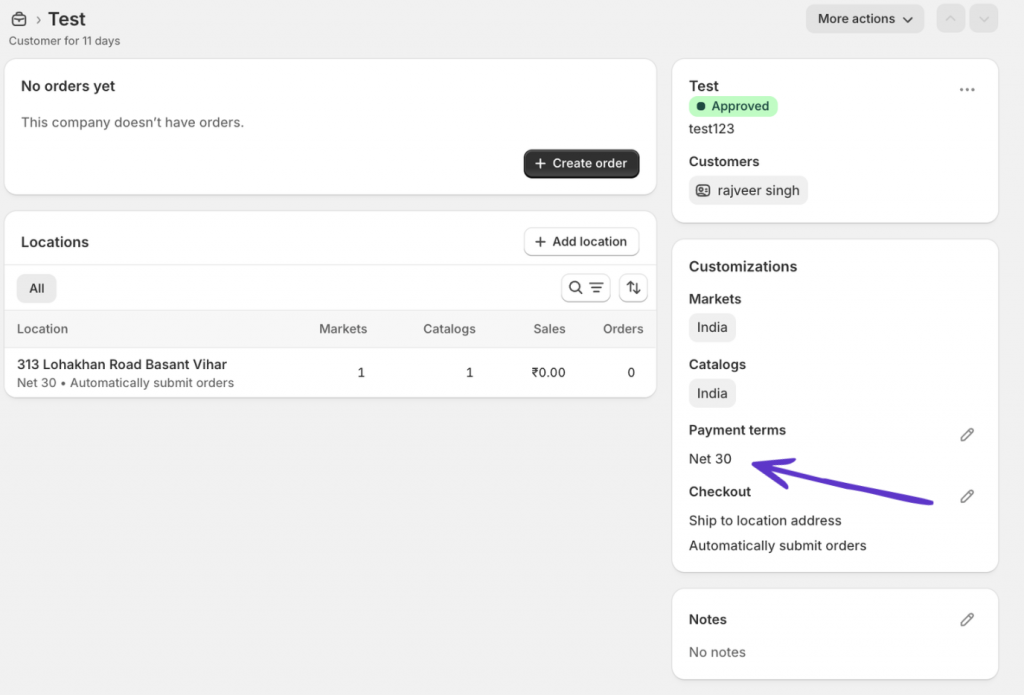
Under the company profile, configure payment terms. Net 15, Net 30, and Net 60 are available on all plans. Deposits and partial payments are Plus only.
Step 8: Invite the Buyer
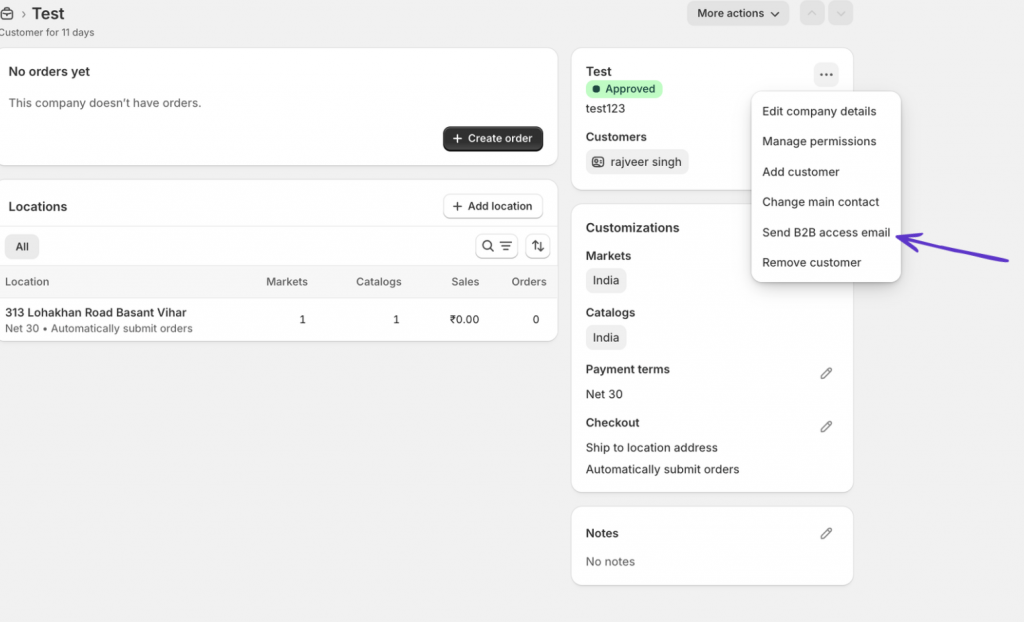
Send the B2B customer an invitation to log in. When they access your store and log into their company account, the catalogue pricing kicks in automatically.
Limitations of Shopify Native B2B Catalogues
The native setup works for straightforward wholesale operations. But the constraints show up fast.
- Three catalogue limit on non-Plus plans: If you need different pricing for more than three customer groups, you are stuck. The only way around it is upgrading to Plus at $2,300 per month or using dedicated Shopify wholesale apps.
- No direct company assignment on non Plus: Catalogues go through Markets. You can not assign Catalogue A to Company X and Catalogue B to Company Y unless you are on Plus.
- No partial payments or deposits without Plus: Buyers either pay in full at checkout or use net terms. There is no middle ground on standard plans.
- Limited discount types: The native system supports percentage adjustments and fixed prices. It does not natively support tiered discounts based on cart total, buy X get Y structures, or discount codes that stack with catalogue pricing.
- No built in wholesale registration form: Buyers need to be manually added as companies. There is no self serve signup flow where a new wholesale customer applies and gets approved.
- No product visibility control beyond the catalogue: If you want to hide prices from logged out visitors or restrict entire pages, you need additional tools.
How to Set Up a B2B Catalogue in Shopify Using Wholesale Pricing Discount (WPD)
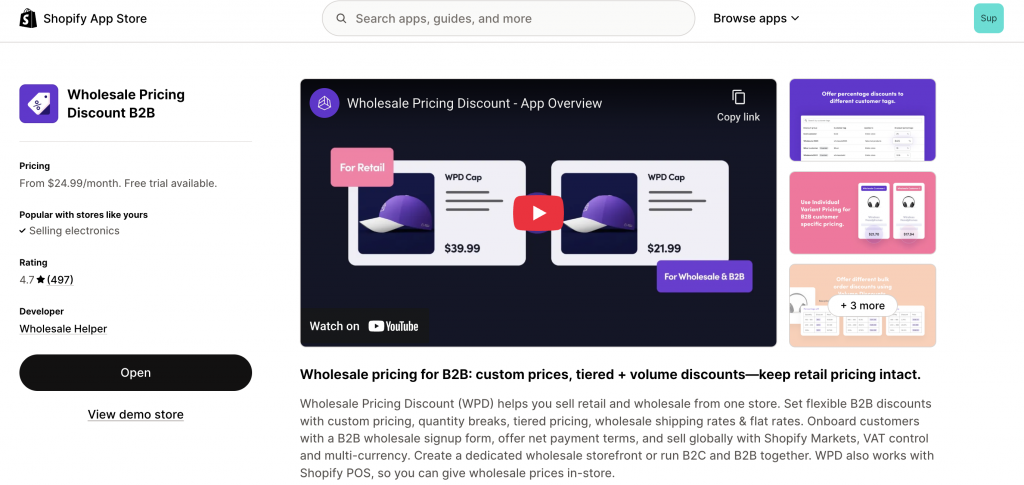
Wholesale Pricing Discount by Wholesale Helper takes a different approach. Instead of a rigid catalogue system, it uses customer tags and discount groups to build flexible B2B pricing enabling you to set up your B2B Catalogue in Shopify.
This works on any Shopify plan. No Plus requirement. No 3 catalogue limit.
Step 1: Install WPD from the Shopify App Store
Search for Wholesale Pricing Discount B2B in the App Store. Install and approve the app.
Step 2: Create a Discount Group
In the WPD dashboard, create a discount group. Name it after the wholesale tier or customer segment. Examples: “Gold Wholesale,” “Regional Distributors,” “Trade Partners.”
Each group acts like a catalogue but without the hard limit.
Step 3: Set Discount Rules
Choose how pricing works for this group.
Percentage discounts across all products or specific collections. Custom fixed prices per product or variant. Tiered pricing with quantity breaks. Volume discounts that scale with order size.
You can combine these in one group. A blanket 20% off with custom prices on selected items and volume tiers on high demand SKUs.
Step 4: Assign Customers
Tag customers in Shopify with the group tag. WPD reads the tag and applies the correct pricing automatically at checkout.
You can do this manually or use the built in wholesale registration form. New wholesale buyers fill out an application. You review and approve it. On approval, WPD tags them and they get access to their pricing tier instantly.
Step 5: Configure Additional B2B Settings
WPD includes features that Shopify native does not offer on standard plans.
Net payment terms (Net 15, Net 30, Net 60). Wholesale shipping rates and flat rate shipping overrides. Tax display controls and VAT exemption rules. Minimum and maximum order amounts per group. Bulk import and export for pricing across large catalogues.
Step 6: Test the Experience
Log in as a test customer with the relevant tag. Check that pricing displays correctly on product pages, in the cart, and at checkout. Verify quantity rules and shipping overrides are working.
Shopify Native B2B Catalogues vs. WPD: Feature Comparison
| Feature | Shopify Native (Non Plus) | Shopify Plus | WPD (Any Plan) |
| Active catalogues / pricing groups | 3 max | Unlimited | Unlimited |
| Percentage discounts | Yes | Yes | Yes |
| Fixed prices per variant | Yes | Yes | Yes |
| Volume pricing | Yes | Yes | Yes |
| Quantity rules (min/max/increment) | Yes | Yes | Yes |
| Direct company assignment | No (Markets only) | Yes | Yes (via tags) |
| Wholesale registration form | Via Shopify Forms | Yes | Yes |
| Net payment terms | Yes | Yes | Yes |
| Partial payments / deposits | No | Yes | Yes |
| Custom shipping rates | No | Yes | Yes |
| Tax display / VAT control | Limited | Limited | Yes |
| Order minimums by group | No | Yes | Yes |
| Bulk price import/export | Yes | Yes | Yes |
| Shopify POS integration | Yes | Yes | Yes |
| Multi currency support | Yes | Yes | Yes |
| Monthly cost | $39 to $399 (plan cost) | From $2,300 | From $24.99 + Shopify Plan Charges |
When to Use Native vs. an App
Use Shopify native if you have fewer than 3 wholesale pricing tiers, your buyers all fall under similar terms, and you do not need custom registration or advanced shipping rules. The native system is clean and integrated. For simple setups, it works.
Use an app like Wholesale Pricing Discount B2B if you have more than 3 customer segments, need per customer pricing without paying for Plus, want a wholesale signup form, or require controls over shipping, tax display, and order limits that the native system does not provide.
A lot of merchants start with native and move to an app once they outgrow the 3 catalogue cap. That transition is smooth since WPD works alongside your existing Shopify setup without replacing anything.
Frequently Asked Questions
How many B2B catalogues can I create on Shopify Basic?
You can assign up to 3 active B2B catalogues across all your B2B markets on the Basic plan. This limit also applies to the Grow and Advanced plans. Shopify Plus offers unlimited catalogues.
Can I assign a B2B catalogue to a specific company on Shopify Basic?
No. On Basic, Grow, and Advanced plans, catalogues are assigned through Shopify Markets, not to individual companies. Direct company and company location assignment is a Shopify Plus feature.
Do I need Shopify Plus to sell wholesale on Shopify?
No. As of April 2026, Shopify offers B2B features on all paid plans including Basic at $39 per month. However, the non Plus plans have limits on catalogue count, company assignment, and advanced payment options. Apps like Wholesale Pricing Discount (WPD) can fill those gaps on any plan.
What is the difference between a B2B catalogue and a collection in Shopify?
A collection is a grouping of products visible to all store visitors. A B2B catalogue is a pricing and product visibility layer that only applies to logged in B2B customers. Catalogues can include products from multiple collections and set different prices for each wholesale buyer or buyer group.
Can I use both Shopify native B2B and a wholesale app at the same time?
Yes. Many merchants use Shopify’s native company profiles and catalogues alongside apps like WPD for added flexibility. WPD works with customer tags and does not conflict with native B2B features.
How do I show different prices to different wholesale customers?
On Shopify Plus, assign separate catalogues directly to each company location. On non Plus plans, you are limited to 3 market level catalogues. Apps like Wholesale Pricing Discount let you create unlimited pricing groups using customer tags, giving each buyer or buyer segment their own rates on any plan.